- Subscribe to RSS Feed
- Mark Topic as New
- Mark Topic as Read
- Float this Topic for Current User
- Bookmark
- Subscribe
- Mute
- Printer Friendly Page
Reference Library for Converting Between LabVIEW and XML Data (GXML)

 viScience
10-29-2010 10:22 AM
- Mark as New
- Bookmark
- Subscribe
- Mute
- Subscribe to RSS Feed
- Permalink
- Report to a Moderator
I did not think to use those since they seem like they were designed for Windows not RT. Maybe you could consider leaving the dialog subvi's out for a cross platform version.

 Jeff_T.
10-29-2010 10:29 AM
- Mark as New
- Bookmark
- Subscribe
- Mute
- Subscribe to RSS Feed
- Permalink
- Report to a Moderator
They work fine in RT if you wire a file path to them.
Regards,
Jeff Tipps
S&V Systems Engineer
viScience
10-29-2010 11:03 AM
- Mark as New
- Bookmark
- Subscribe
- Mute
- Subscribe to RSS Feed
- Permalink
- Report to a Moderator
Yes of course, but I find that it is better not to drag that stuff into an RT hierarchy. Often I will get wierd project error popups related to the use of unsupported RT features for such things.
viScience
11-01-2010 04:41 PM - edited 11-01-2010 04:42 PM
- Mark as New
- Bookmark
- Subscribe
- Mute
- Subscribe to RSS Feed
- Permalink
- Report to a Moderator
Since I added the GXML vi's in an app, my built exe is giving me a runtime error (see attachment). Also, if it makes a difference I moved the installation hierarchy to my own location outside of the LV folder but the app does run fine from the development environment.
 Jeff_T.
11-02-2010 08:47 AM
- Mark as New
- Bookmark
- Subscribe
- Mute
- Subscribe to RSS Feed
- Permalink
- Report to a Moderator
Sachsm,
It looks like there are several components that your VI cannot find. I recommend taking this question to the general LabVIEW forum.
Regards,
Jeff Tipps
S&V Systems Engineer
viScience
11-02-2010 11:31 AM - edited 11-02-2010 11:31 AM
- Mark as New
- Bookmark
- Subscribe
- Mute
- Subscribe to RSS Feed
- Permalink
- Report to a Moderator
I went ahead and changed the build options to include all library items and it produced a huge exe and also a dialog box asking me to save 2 vi's from the GXML directory. After I saved these
2 files everythings started to work correctly and was even able to remove the previous build option and have normal sized exe's. Maybe the thing to do before you use the GXML libraries in a build is to mass compile them on your development machine.
viScience
12-20-2010 09:55 AM
- Mark as New
- Bookmark
- Subscribe
- Mute
- Subscribe to RSS Feed
- Permalink
- Report to a Moderator
Example where fast parser works correctly but recursive parser fails. Any idea why?
Jeff_T.
12-20-2010 11:03 AM
- Mark as New
- Bookmark
- Subscribe
- Mute
- Subscribe to RSS Feed
- Permalink
- Report to a Moderator
Hello sachsm,
If you throw the "Simple Error Handler.vi" onto the end of your program GXML is returning the error "XML Closing Tag </Workbook> not found" Now in your XML string the closing tag </Workbook> is there but things do not line up.
First two open tags:
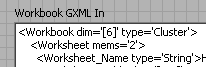
Last two close tags:

Notice how </Workbook> is preceeded by two whitespaces? I know the XML specifications advise processors to ignore whitespaces but in order to enable the search algorithm without forcing you to define a unique name for every item (especially in arrays) I look for the matching closing tag name AND matching whitespace. GXML usually handles all of this but in your case there is this dangling closing tag "</GXML_Root> that is located at the same heirarchy as the open tag <Workbook>.
By looking at the spacing between your first two open tags I suspect you deleted the open tag <GXML_Root> and moved the open tag <Workspace> to the left two spaces. The easiest fix for your string is to also delete </GXML_Root> and move </Workbook> to the left two spaces.
The GXML_Root tags are optional but they exist for concatination purposes. You can flatten GXML strings in two seperate processes and concatinate them together under one container called "GXML_Root". If you are using concatination then you will need to leave those tags alone.
Regards,
Jeff Tipps
S&V Systems Engineer
viScience
12-20-2010 11:52 AM - edited 12-20-2010 11:54 AM
- Mark as New
- Bookmark
- Subscribe
- Mute
- Subscribe to RSS Feed
- Permalink
- Report to a Moderator
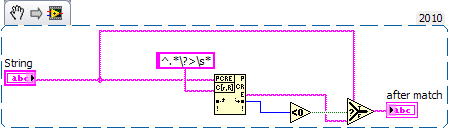
The problem is a bug in the gxml_ReadXMLfromFile.vi that does not work for XML files that lack a version header. (It will unintentionally strip off the first line <GXML_Root>)
Here is the corrected version. Note the \? is needed in the regular expression

 Jeff_T.
12-20-2010 12:37 PM
- Mark as New
- Bookmark
- Subscribe
- Mute
- Subscribe to RSS Feed
- Permalink
- Report to a Moderator
Why would the XML file have no version header?
Jeff
