» Calling External Code From LabVIEW » .NET Assemblies » Calling Methods & Accessing Properties
Once you have a reference to a .NET object, you can call methods of the object and access properties of the object by using an Invoke Node (.NET) and a Property Node (.NET) respectively.
The .NET Invoke Node and Property Node will automatically populate with a list of available methods/properties as soon as you wire in an object reference to the node.
Both these nodes can be found in the .Net Palette (Functions Palette » Connectivity » .NET).
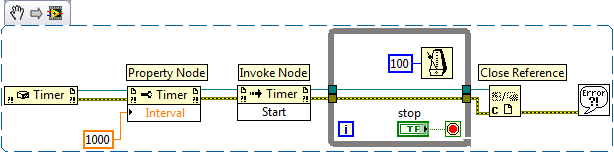
For instance, the following snippet, creates a System.Timers.Timer object, sets the interval to one second (1000 ms) and starts the timer.
Caveat: Calling Static Methods and Accessing Static Properties of a .NET Class
If you want to call static methods or access static properties of a .NET Class, you do not need to have an object instantiated and do not need to wire in a reference to an object. You can specify the class that has the static method/property by right clicking on the Invoke Node or Property Node and selecting Select Class » .NET » Browse….
References & Examples
The following examples install with LabVIEW:
Calculator VI: labview\examples\comm\dotnet\Calculator.llb
SimpleTaskMonitor VI: labview\examples\comm\dotnet\SimpleTaskMonitor.llb
Community Example: Calling .NET Assemblies from LabVIEW
Jervin Justin
NI TestStand Product Manager


