- Subscribe to RSS Feed
- Mark Topic as New
- Mark Topic as Read
- Float this Topic for Current User
- Bookmark
- Subscribe
- Mute
- Printer Friendly Page
Where can I download LabView Toolkit for NXT

 Lydecker
02-02-2012 05:24 PM - edited 02-02-2012 05:25 PM
- Mark as New
- Bookmark
- Subscribe
- Mute
- Subscribe to RSS Feed
- Permalink
- Report to a Moderator
Hello,
Where can I download the LabView Toolkit for Lego Mindstorms NXT to use with LabView 7.1? I would like to create my own block.
The NI website claims on this page http://zone.ni.com/devzone/cda/tut/p/id/4435 that this is the link to the download https://lumen.ni.com/nicif/us/evallegotoolkit/content.xhtml however it is a lie as it takes you to the download for NI LabVIEW for LEGO® MINDSTORMS which is not the same product (and does not support making blocks for the NXT-G Software).
Is there anywhere I can get a copy of the old toolkit, or are you saying it no longer possible to create your own blocks for the NXT-G software (that I would find hard to believe.)
Thank you.

02-07-2012 05:45 AM
- Mark as New
- Bookmark
- Subscribe
- Mute
- Subscribe to RSS Feed
- Permalink
- Report to a Moderator
Hello Lydecker,
On the same page you describe seeing the download for 'NI LabVIEW for LEGO® MINDSTORMS' there is a drop down section for downloading the module on it's own without LabVIEW. Have you tried this?
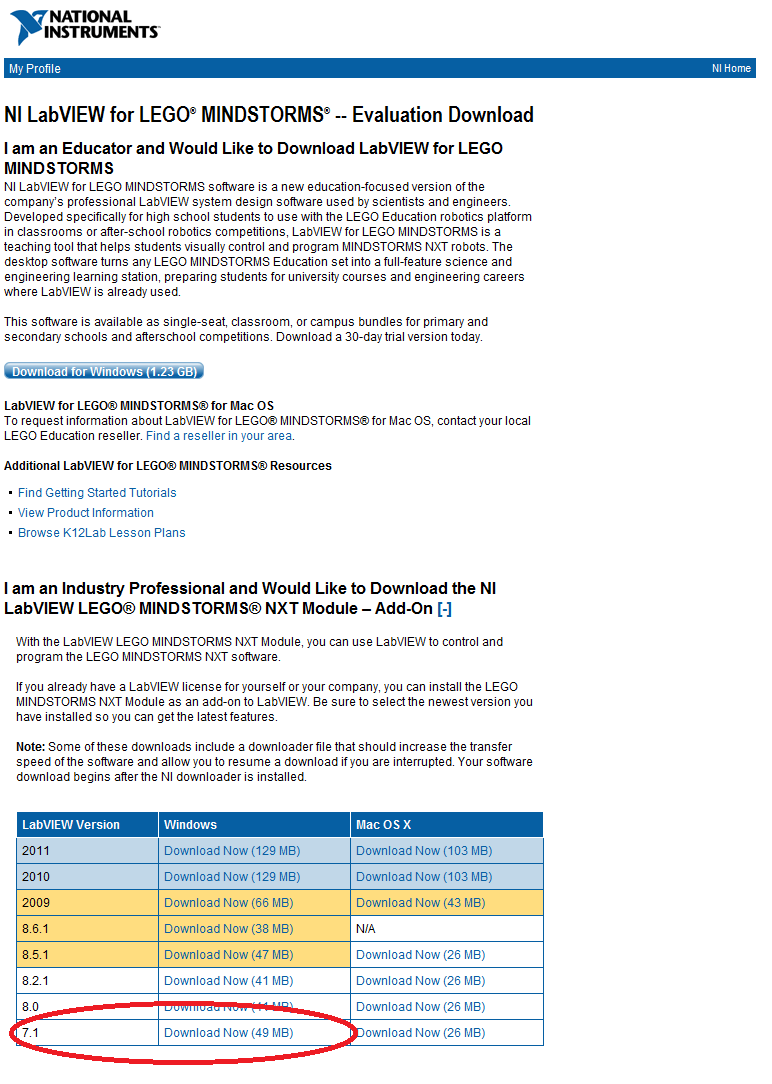
I believe this is all you need. After a restart you should then be able to access the block wizard In LabVIEW, select Tools»NXT Module»New NXT Block Wizard
Full instruction on the steps needed to create a block are in the following document -
Creating LEGO® MINDSTORMS® NXT Software Blocks- ftp://ftp.ni.com/evaluation/mindstorms/NXT_Creating_MINDSTORMS_Blocks.pdf
Hope this helps
Applications Engineer
National Instruments
 流年似水
流年似水
11-24-2012 02:46 AM
- Mark as New
- Bookmark
- Subscribe
- Mute
- Subscribe to RSS Feed
- Permalink
- Report to a Moderator
hello,I have installed LV2011NXT,why tool>...... have not NXT module?

 MahdiehG
11-26-2012 07:04 AM
- Mark as New
- Bookmark
- Subscribe
- Mute
- Subscribe to RSS Feed
- Permalink
- Report to a Moderator
Hello,
If this is a new question I would recommend that you create a new thread. Also if you are more descriptive about your problem in the initial post it will help everyone in the community to answer your question.
Regards,
Applications Engineer
National Instruments UK&Ireland
 YetiPro
02-11-2018 05:59 PM
- Mark as New
- Bookmark
- Subscribe
- Mute
- Subscribe to RSS Feed
- Permalink
- Report to a Moderator
wrote:
Hello Lydecker,
On the same page you describe seeing the download for 'NI LabVIEW for LEGO® MINDSTORMS' there is a drop down section for downloading the module on it's own without LabVIEW. Have you tried this?
I believe this is all you need. After a restart you should then be able to access the block wizard In LabVIEW, select Tools»NXT Module»New NXT Block Wizard
Full instruction on the steps needed to create a block are in the following document -
Creating LEGO® MINDSTORMS® NXT Software Blocks- ftp://ftp.ni.com/evaluation/mindstorms/NXT_Creating_MINDSTORMS_Blocks.pdf
Hope this helps
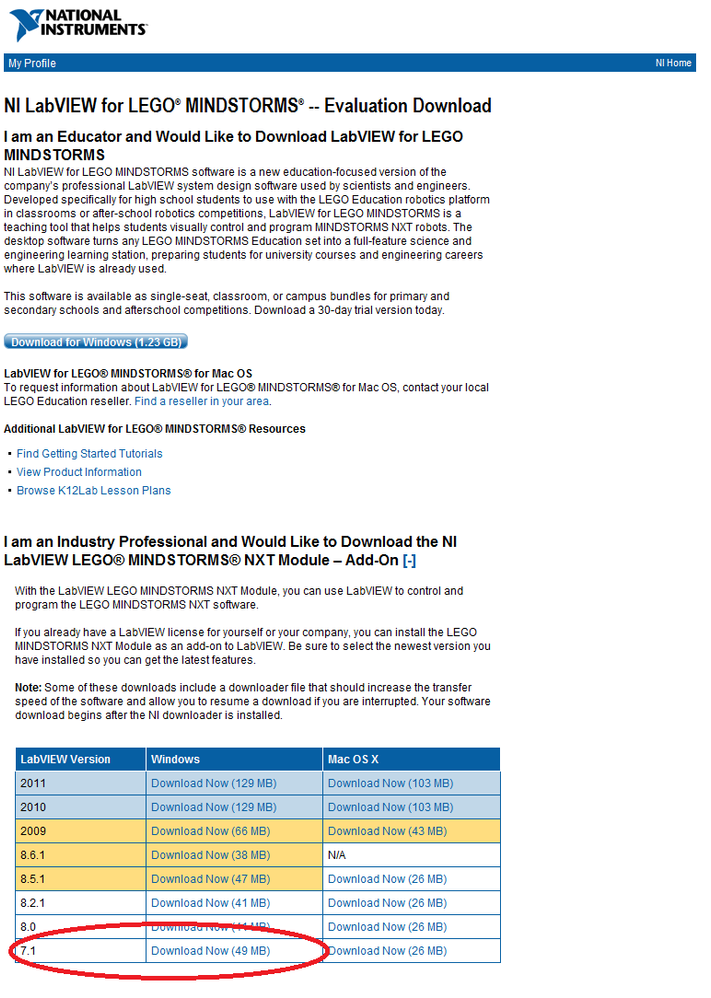

Well, I just found my brothers old Mindstorms and I've fallen in love with them but I am trying to find the download for the program and I can't find this page so could you link it or something like that?

02-15-2018 02:02 AM
- Mark as New
- Bookmark
- Subscribe
- Mute
- Subscribe to RSS Feed
- Permalink
- Report to a Moderator
Hello YetiPro!
I found this link for you: NI LabVIEW Module for LEGO® MINDSTORMS®
Open the tab Resources and you will find a link Download LabVIEW Module for LEGO® MINDSTORMS®
That list includes direct download links for LabVIEW 2016 back to 2012. If you need an older version click See the full list of software versions available at the bottom and you will be taken to the page where the screenshot you quoted came from. by today the list in there has versions 2015 back to 7.1. I checked the download link for 7.1, it still works.
Hope this helps!
Ingo – LabVIEW 2013, 2014, 2015, 2016, 2017, 2018, NXG 2.0, 2.1, 3.0
