ni.com is currently undergoing scheduled maintenance.
Some services may be unavailable at this time. Please contact us for help or try again later.
Turn on suggestions
Auto-suggest helps you quickly narrow down your search results by suggesting possible matches as you type.
Showing results for
Topic Options
- Subscribe to RSS Feed
- Mark Topic as New
- Mark Topic as Read
- Float this Topic for Current User
- Bookmark
- Subscribe
- Mute
- Printer Friendly Page
How to convert 1d array containing RGB data into a 2d array to show with IMAQ display

 GustavoRamirez
Member
11-09-2006 08:26 PM
Options
- Mark as New
- Bookmark
- Subscribe
- Mute
- Subscribe to RSS Feed
- Permalink
- Report to a Moderator
Hi, I'd like to know if there is a way to convert my array into a 2d array in order to load it to a IMAQ display using ArrayToImage.
This is is how the data is arranged in the array
Element0 =R
Element1=G
Element2=B
Element3 =R
Element4=G
Element5=B
Element6 = R
Element7=G
Element8=B
...
Element N
The size of the array is = width * height * 3...
I want to know if there is a way to convert this array to a 2d Array to use with imaq.
I can't figure out how to do it in labview, I did the same in VB 6.0, but I'm newbiee at LabVIEW...
This is the code I used in VB.
bReval = StCam_TakePreviewSnapShot( m_hCamera, pbyteImageBuffer(0), dwBufferSize, dwNumberOfByteTrans, dwFrameNo, dwMilliseconds)
' m_hCamera = is the handler of the camera
' pbyteImageBuffer(0) = is the Buffer where the image is stored
' dwBufferSize = width * height * 3 = 1024 * 768 * 3
'Then I convert the 1d buffer to a 2d array
i = 0
For k = 0 To 767
For j = 0 To 1023
myImageArray(j, k) = RGB(CInt(pbyteImageBuffer(i + 2)), CInt(pbyteImageBuffer(i + 1)), CInt(pbyteImageBuffer(i)))
i = i + 3
Next j
Next k
'And finally I create the image with the given 2d array
frmMain.CWIMAQViewer1.Image.ArrayToImage myImageArray
Thanks.
Attatched is the vi I'm using, and also a picture of the vi.
Gustavo Ramirez.
Test Equipment Sw Engineer,
Stoneridge Co.
This is is how the data is arranged in the array
Element0 =R
Element1=G
Element2=B
Element3 =R
Element4=G
Element5=B
Element6 = R
Element7=G
Element8=B
...
Element N
The size of the array is = width * height * 3...
I want to know if there is a way to convert this array to a 2d Array to use with imaq.
I can't figure out how to do it in labview, I did the same in VB 6.0, but I'm newbiee at LabVIEW...
This is the code I used in VB.
bReval = StCam_TakePreviewSnapShot( m_hCamera, pbyteImageBuffer(0), dwBufferSize, dwNumberOfByteTrans, dwFrameNo, dwMilliseconds)
' m_hCamera = is the handler of the camera
' pbyteImageBuffer(0) = is the Buffer where the image is stored
' dwBufferSize = width * height * 3 = 1024 * 768 * 3
'Then I convert the 1d buffer to a 2d array
i = 0
For k = 0 To 767
For j = 0 To 1023
myImageArray(j, k) = RGB(CInt(pbyteImageBuffer(i + 2)), CInt(pbyteImageBuffer(i + 1)), CInt(pbyteImageBuffer(i)))
i = i + 3
Next j
Next k
'And finally I create the image with the given 2d array
frmMain.CWIMAQViewer1.Image.ArrayToImage myImageArray
Thanks.
Attatched is the vi I'm using, and also a picture of the vi.
Gustavo Ramirez.
Test Equipment Sw Engineer,
Stoneridge Co.

 AdamB
AdamB
Active Participant
11-10-2006 03:04 AM - edited 11-10-2006 03:04 AM
Options
- Mark as New
- Bookmark
- Subscribe
- Mute
- Subscribe to RSS Feed
- Permalink
- Report to a Moderator
Hey,
Somthing like this should do it.
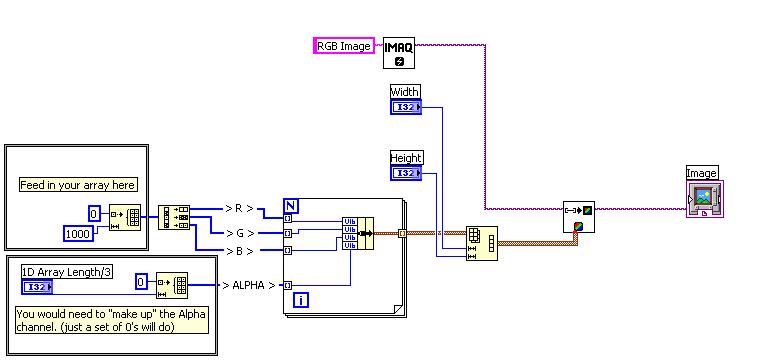
Good luck with it.
Let me know how you get on.
AdamB
Message Edited by AdamB on 11-10-2006 03:05 AM
Applications Engineering Team Leader | National Instruments | UK & Ireland

11-10-2006 01:30 PM - edited 11-10-2006 01:30 PM
Options
- Mark as New
- Bookmark
- Subscribe
- Mute
- Subscribe to RSS Feed
- Permalink
- Report to a Moderator
Hi AdamB.
I found a way to do it based on the example you provided to me.
It was a great Help.

Thank you.
Gustavo Ramirez V.
I found a way to do it based on the example you provided to me.
It was a great Help.
Thank you.
Gustavo Ramirez V.
Message Edited by GustavoRamirez on 11-10-2006 01:31 PM

