- Subscribe to RSS Feed
- Mark Topic as New
- Mark Topic as Read
- Float this Topic for Current User
- Bookmark
- Subscribe
- Mute
- Printer Friendly Page
text file operation....

 RSibagatullin
06-17-2008 04:23 PM
- Mark as New
- Bookmark
- Subscribe
- Mute
- Subscribe to RSS Feed
- Permalink
- Report to a Moderator
The second feauture I want to implement is that if a user saves data I want the program to remember the folder path where the user saved the data so that during the next run the program will offer to write in the same folder or even file. Should i use and .ini file for this or something?
Please see my current simple code.

 MikeS81
06-17-2008 04:26 PM - edited 06-17-2008 04:28 PM
- Mark as New
- Bookmark
- Subscribe
- Mute
- Subscribe to RSS Feed
- Permalink
- Report to a Moderator
to append data you can use the "?? set cursor vi (in 7.1 it´s called seek)" to set the write position to the end of the file. If you want to use the path more than ones while the vi is running, then you can store it in a shift register, otherwise you can write it to an ini file.
Mike
Message Edited by MikeS81 on 06-17-2008 11:28 PM
 smercurio_fc
06-17-2008 04:27 PM
- Mark as New
- Bookmark
- Subscribe
- Mute
- Subscribe to RSS Feed
- Permalink
- Report to a Moderator
For the second part: An INI file will work just fine for that.
06-17-2008 07:12 PM
- Mark as New
- Bookmark
- Subscribe
- Mute
- Subscribe to RSS Feed
- Permalink
- Report to a Moderator
 Ray.R
Ray.R

06-17-2008 08:08 PM
- Mark as New
- Bookmark
- Subscribe
- Mute
- Subscribe to RSS Feed
- Permalink
- Report to a Moderator
Ray.R
06-17-2008 08:21 PM
- Mark as New
- Bookmark
- Subscribe
- Mute
- Subscribe to RSS Feed
- Permalink
- Report to a Moderator
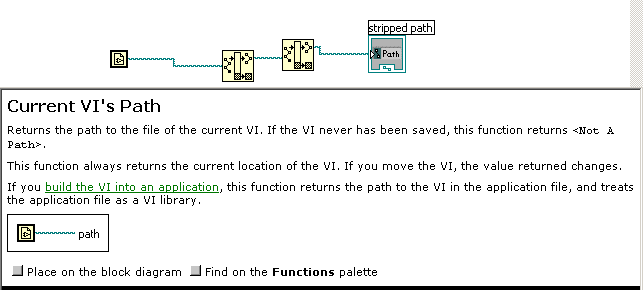
Read the info below in the attached image:
RayR


Have a look at this thread: http://forums.ni.com/ni/board/message?board.id=170&view=by_date_ascending&message.id=331832#M331832
smercurio_fc
06-18-2008 09:17 AM
- Mark as New
- Bookmark
- Subscribe
- Mute
- Subscribe to RSS Feed
- Permalink
- Report to a Moderator

06-19-2008 07:31 AM
- Mark as New
- Bookmark
- Subscribe
- Mute
- Subscribe to RSS Feed
- Permalink
- Report to a Moderator
