ni.com is currently undergoing scheduled maintenance.
Some services may be unavailable at this time. Please contact us for help or try again later.
- Subscribe to RSS Feed
- Mark Topic as New
- Mark Topic as Read
- Float this Topic for Current User
- Bookmark
- Subscribe
- Mute
- Printer Friendly Page
serial read, and data import into spreadsheet

 tgilbert
08-10-2011 08:44 AM
- Mark as New
- Bookmark
- Subscribe
- Mute
- Subscribe to RSS Feed
- Permalink
- Report to a Moderator
I'm collecting serial data (from an RS232 port), and want to write it to a spreadsheet. I've been working on this problem for a few days (have been stumbling, and haven't found any related posts), and have some formatting issues. I'm thinking I need to create an array for the headings, and another for the data? I've been having issues with data type errors, and I need some help. The results should look something like this...
| Date | Time | Data |
| 8Aug2011 | 8:25:16 | 5.00 |
| 8Aug2011 | 8:25:21 | 4.80 |
| 8Aug2011 | 8:25:26 | 4.75 |
| 8Aug2011 | 8:25:31 | 4.50 |
| 8Aug2011 | 8:25:36 | 4.40 |
| 8Aug2011 | 8:25:41 | 4.00 |
| 8Aug2011 | 8:25:46 | 3.50 |
What's the best way to do this?
Thanks,
tgilbert

 Broken_Arrow

08-10-2011 09:11 AM
- Mark as New
- Bookmark
- Subscribe
- Mute
- Subscribe to RSS Feed
- Permalink
- Report to a Moderator
Look at this recent post. Jeff and myself provide two methods of how to this.

08-10-2011 09:59 AM
- Mark as New
- Bookmark
- Subscribe
- Mute
- Subscribe to RSS Feed
- Permalink
- Report to a Moderator
Thanks. I have a specific question, and then a general one. Where can I find this? And, is there some sort of document that shows all LabVIEW images, and where to find them (i.e. - where in the Functions menus)?

Alex Lifeson
Broken_Arrow
08-10-2011 10:07 AM - edited 08-10-2011 10:09 AM
- Mark as New
- Bookmark
- Subscribe
- Mute
- Subscribe to RSS Feed
- Permalink
- Report to a Moderator
Hi Alex 
That's simply an Array Constant of Strings that I made.
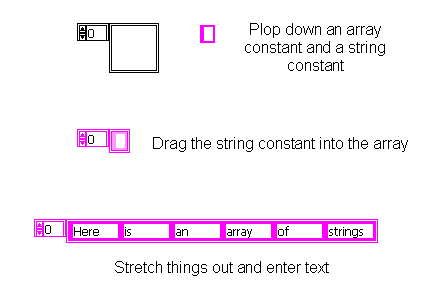
p.s.: The word "Header" above the original constant is the Label, which I named "Header".
08-10-2011 10:20 AM
- Mark as New
- Bookmark
- Subscribe
- Mute
- Subscribe to RSS Feed
- Permalink
- Report to a Moderator
Got it - easy peasy one, two, threesy. I haven't used LabVIEW for about year, and I already forgot that - alzheimer's moment.
Thanks.
08-10-2011 10:49 AM
- Mark as New
- Bookmark
- Subscribe
- Mute
- Subscribe to RSS Feed
- Permalink
- Report to a Moderator
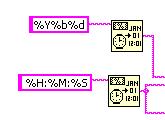
Another question. How do I format the date/time data going into excel? I'm using "%Y%b%d" for the date (result is an integer); and "%H:%M:%S" for the time (result is an integer). LabVIEW indicators display formatting appropriately. There must be something happening when the data gets moved into the spreadsheet - BTW, I opened the file in excel and notepad - same formatting.
08-10-2011 10:58 AM
- Mark as New
- Bookmark
- Subscribe
- Mute
- Subscribe to RSS Feed
- Permalink
- Report to a Moderator
Figured it out. Formatting was %.3f - it should have been %s.
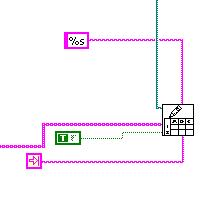
Now Neil Peart
08-10-2011 11:08 AM
- Mark as New
- Bookmark
- Subscribe
- Mute
- Subscribe to RSS Feed
- Permalink
- Report to a Moderator
Yet another thing. Is there a way to set up the serial data capture (and importation into a spreadsheet) to occur indefinitely (without a For-loop restriction)? And, what would the reason be for the date/time/data to be offset by one column, in relation to the header?
08-10-2011 11:15 AM
- Mark as New
- Bookmark
- Subscribe
- Mute
- Subscribe to RSS Feed
- Permalink
- Report to a Moderator
Figured out the offset - it was how I had the date/time/data array arranged. Haven't figured out the endless read part yet.

 Dennis_Knutson
08-10-2011 11:17 AM
- Mark as New
- Bookmark
- Subscribe
- Mute
- Subscribe to RSS Feed
- Permalink
- Report to a Moderator
What is wrong with simply using a while loop?
