ni.com is currently undergoing scheduled maintenance.
Some services may be unavailable at this time. Please contact us for help or try again later.
- Subscribe to RSS Feed
- Mark Topic as New
- Mark Topic as Read
- Float this Topic for Current User
- Bookmark
- Subscribe
- Mute
- Printer Friendly Page
read from Spreadsheet File VI

 DavideTagliabue
08-08-2014 02:10 AM
- Mark as New
- Bookmark
- Subscribe
- Mute
- Subscribe to RSS Feed
- Permalink
- Report to a Moderator
Hello to everyone!
I want to read a spreadsheet file VI, wich contain many rows with this format:
0.475009,0.242797;
0.023044,0.522105;
0.735105,0.634358;
0.955100,0.982586;
etc..
The goal is to divide these rows into 2 array: the first one contains the left number:
0.475009
0.023044
0.735105
0.955100
while the right one contains the right number:
0.242797
0.522105
0.634358
0.982586
Someone can help me?
Thanks and
Best regards!

 GerdW
GerdW

08-08-2014 02:15 AM
- Mark as New
- Bookmark
- Subscribe
- Mute
- Subscribe to RSS Feed
- Permalink
- Report to a Moderator
Hi Davide,
do you think you can make your way starting from this snippet?

It's rather unusual to have a different delimiter to denote EOL. You should use a comma only between numbers and get rid of the semicolon at EOL!
GerdW
using LV2016/2019/2021 on Win10/11+cRIO, TestStand2016/2019
08-08-2014 02:42 AM
- Mark as New
- Bookmark
- Subscribe
- Mute
- Subscribe to RSS Feed
- Permalink
- Report to a Moderator
Hi GerdW.
The end of line delimiter is ;
with comma i separate two different measurements: the left numbers rapresent a current measure, while the right numbers a voltage measure.
I want to read my csv file, split the numbers into two different array, then plot the current and the voltage.
My start point is:
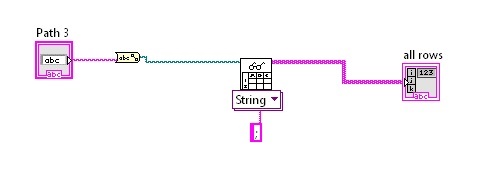
where all rows are like this:
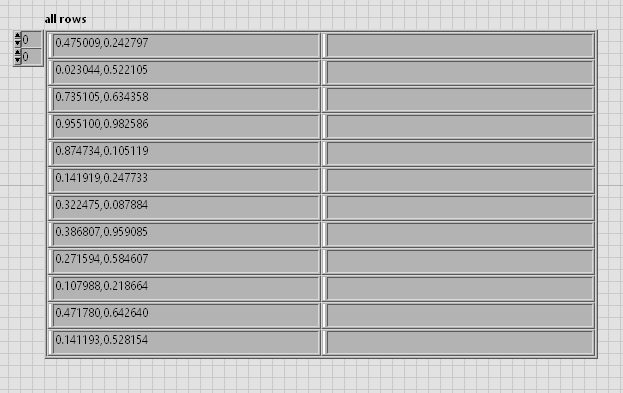
i want to separate the left numbers and the right numbers into two array
Best regards
GerdW
08-08-2014 02:49 AM - edited 08-08-2014 02:50 AM
- Mark as New
- Bookmark
- Subscribe
- Mute
- Subscribe to RSS Feed
- Permalink
- Report to a Moderator
Hi Davide,
1. You need to give the separator char between your numbers, not the EOL char: change your string constant from semicolon to comma!
2. From your description I still think the semicolon is useless as you (probably) have some real EOL chars in your text file (CR, LF, or combination of both)!
GerdW
using LV2016/2019/2021 on Win10/11+cRIO, TestStand2016/2019

 daveTW
08-08-2014 03:03 AM
- Mark as New
- Bookmark
- Subscribe
- Mute
- Subscribe to RSS Feed
- Permalink
- Report to a Moderator
3. And you should change the type of the "Read from Spreadsheet File"- VI to Dbl, then it should ignore the semicolon and gives back the datatype you need.
08-08-2014 04:24 AM
- Mark as New
- Bookmark
- Subscribe
- Mute
- Subscribe to RSS Feed
- Permalink
- Report to a Moderator
Resolved!
Thanks a lot!
Best regards
GerdW
08-08-2014 04:25 AM
- Mark as New
- Bookmark
- Subscribe
- Mute
- Subscribe to RSS Feed
- Permalink
- Report to a Moderator
Hi Davide,
usually the OP also tells how a problem was solved, to help others experiencing the same (or very similar) problem…
GerdW
using LV2016/2019/2021 on Win10/11+cRIO, TestStand2016/2019
