- Subscribe to RSS Feed
- Mark Topic as New
- Mark Topic as Read
- Float this Topic for Current User
- Bookmark
- Subscribe
- Mute
- Printer Friendly Page
live update of Table indicator.
Solved!
 labmaster
07-20-2020 01:44 AM - edited 07-20-2020 01:45 AM
- Mark as New
- Bookmark
- Subscribe
- Mute
- Subscribe to RSS Feed
- Permalink
- Report to a Moderator
I have a trouble in updating a Table indicator having "color" background.
To see my trouble, please do the following or open the jpg file in attachment.
1. Run main.vi (~15 row)
(the numeric value seemed to be over-written in bold)
2. Stop
3. Run main.vi (~15 row)
If one cell is clicked in execution or stop the program, the display of indicator seemed to be normal.
Please leave any comments if you find a solution.
labmaster.
Solved! Go to Solution.

 altenbach

07-20-2020 01:49 AM - edited 07-20-2020 01:54 AM
- Mark as New
- Bookmark
- Subscribe
- Mute
- Subscribe to RSS Feed
- Permalink
- Report to a Moderator
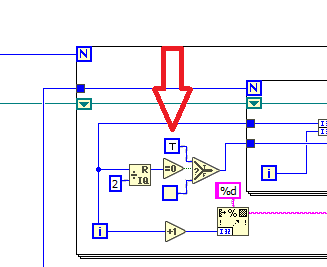
 altenbach
07-20-2020 02:16 AM - edited 07-20-2020 09:49 AM
- Mark as New
- Bookmark
- Subscribe
- Mute
- Subscribe to RSS Feed
- Permalink
- Report to a Moderator
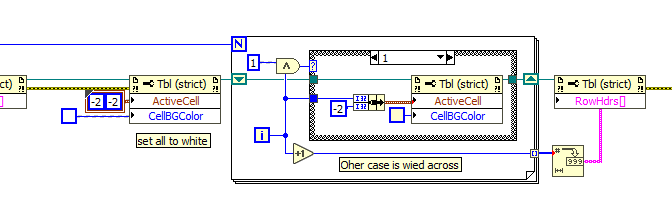
Also note that you should clear all background colors before the second loop (just a single property node with cell=[-2,-2] and color white. Now you can skip half of the rows for half the effort. (You could even eliminate the inner loop by specifying each entire row (-2)
Her's how the second loop could look like (Modify as needed):

07-20-2020 04:55 AM
- Mark as New
- Bookmark
- Subscribe
- Mute
- Subscribe to RSS Feed
- Permalink
- Report to a Moderator
Wow. great thank you!.
