- Subscribe to RSS Feed
- Mark Topic as New
- Mark Topic as Read
- Float this Topic for Current User
- Bookmark
- Subscribe
- Mute
- Printer Friendly Page
export waveform to excel
Solved!
 Emna20
07-15-2019 06:17 AM
- Mark as New
- Bookmark
- Subscribe
- Mute
- Subscribe to RSS Feed
- Permalink
- Report to a Moderator
Hi ,
I want to know how to export all the data displayed in the waveform graph to Excel ?
i use Create _> Invoke node _> Export Data to Excel . But in Excel I didn't get all the data ( see my programme below ) .

Solved! Go to Solution.
07-15-2019 06:19 AM
- Mark as New
- Bookmark
- Subscribe
- Mute
- Subscribe to RSS Feed
- Permalink
- Report to a Moderator
hi ,
My program Consist of extracting the Current and Voltage for 60 seconds (1 minute ) .
Best regard .
Thank you .
- Tags:
- LabVIEW

 Bob_Schor

07-15-2019 09:25 AM
- Mark as New
- Bookmark
- Subscribe
- Mute
- Subscribe to RSS Feed
- Permalink
- Report to a Moderator
Hi. I was unable to open your VI in LabVIEW 2018 (the Front Panel opened, but I never got the Block Diagram to appear), but if the picture you embedded in your post is the same as your Block Diagram, the answer is obvious -- you have not learned the Principle of Data Flow, the central Principle that governs LabVIEW programming. Notice that the two Graph Methods to Export Data to Excel are unconnected to any other code, so you have no idea (and no control) over when they will run. It is highly likely that they will export data when the code starts to run, before any data are placed in the Graphs.
Notice that these Methods have Error In and Error Out terminals. Attach them to the Error Line after the Error line exits from the While Loop, which (again, by the Principle of Data Flow), will be after all of the data have been plotted. So the order (determined by the Error Line Running Through It) is Initialize and Start DAQ process, Acquire and Plot Data until Elapsed Time Expires, Stop DAQ processes, and Export Data to Excel.
Bob Schor
07-16-2019 02:59 AM
- Mark as New
- Bookmark
- Subscribe
- Mute
- Subscribe to RSS Feed
- Permalink
- Report to a Moderator
Hi Bob_Schor ,
Thank you .
Even when i put the export data to Excel node after the While Loop ( using the data flow ) the Excel file only have the last signal displayed in the waveform graph . what i want first is to display the signal during 60 seconds in the waveform graph and then saving the signal in Excel file .
best regards .

 GerdW
GerdW
07-16-2019 03:15 AM
- Mark as New
- Bookmark
- Subscribe
- Mute
- Subscribe to RSS Feed
- Permalink
- Report to a Moderator
Hi Emna,
instead of using a graph as data buffer you should write your data directly to a file! (You don't want to keep 60*50k*2 = 6M samples in memory and additionally in your graphs…)
Right now you read 50k samples at a rate of 50kHz, so worth of 1s of data. That is displayed in your graphs and also exported to Excel.
I suggest to enable writing DAQmx data to TDMS files directly by the DAQmx driver to save "all" data to files.
Excel can open those TDMS files due to the TDMS import filter installed with LabVIEW…
GerdW
using LV2016/2019/2021 on Win10/11+cRIO, TestStand2016/2019
07-16-2019 05:50 AM
- Mark as New
- Bookmark
- Subscribe
- Mute
- Subscribe to RSS Feed
- Permalink
- Report to a Moderator
Hi ,
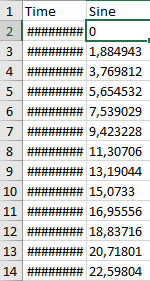
i use the Write To Measurement file with Sine signal as an example ( before using the cDAQmx ) .
i chose to export data to excel file but in the column of time i get this (########) . i want to fix the time from 0 seconds to 60 seconds .(see the program below ).
best regards .

 johntrich1971
07-16-2019 06:09 AM
- Mark as New
- Bookmark
- Subscribe
- Mute
- Subscribe to RSS Feed
- Permalink
- Report to a Moderator
Make your time column wider in your Excel sheet.
07-17-2019 04:50 AM
- Mark as New
- Bookmark
- Subscribe
- Mute
- Subscribe to RSS Feed
- Permalink
- Report to a Moderator
Hi ,
please help me to change the axis of time to be from 0 seconds to 60 seconds in the Waveform graph .
best regards .
GerdW
07-17-2019 04:56 AM
- Mark as New
- Bookmark
- Subscribe
- Mute
- Subscribe to RSS Feed
- Permalink
- Report to a Moderator
Hi Emna,
change the axis of time to be from 0 seconds to 60 seconds in the Waveform graph .
Disable autoscaling of the X axis.
Then set 0 and 60 as min/max…
GerdW
using LV2016/2019/2021 on Win10/11+cRIO, TestStand2016/2019
07-17-2019 06:40 AM
- Mark as New
- Bookmark
- Subscribe
- Mute
- Subscribe to RSS Feed
- Permalink
- Report to a Moderator
Hi GerdW (Knight of NI) ,
My program Consist of extracting Current and Voltage from a device in 60 seconds using cDAQ and display this information in the Waveform graph and also save the signal in Excel file .
right now i am note conected to the cDAQ so in order to verify my program before using the cDAQ .i use the Simulate signal block to generate the signale . all i want is to generate a sine Wave during 60s and display this signale in the Waveform graph ( the X axis to be from 0 to 60s ) and the Excel file Contains two Column ( Column 1 :Time (S) Column 2 : Sine Wave ) .
when i Disable Autoscale and put 0 Min 60 Max . ( the Waveform graph didn't display the signal )
( You find below my program With Simulate signal block ).
Best regards .
