ni.com is currently undergoing scheduled maintenance.
Some services may be unavailable at this time. Please contact us for help or try again later.
- Subscribe to RSS Feed
- Mark Topic as New
- Mark Topic as Read
- Float this Topic for Current User
- Bookmark
- Subscribe
- Mute
- Printer Friendly Page
WebDAV SSL configuration

 Koryš
Koryš
07-22-2016 03:01 AM
- Mark as New
- Bookmark
- Subscribe
- Mute
- Subscribe to RSS Feed
- Permalink
- Report to a Moderator
Hey guys, here is my problem:
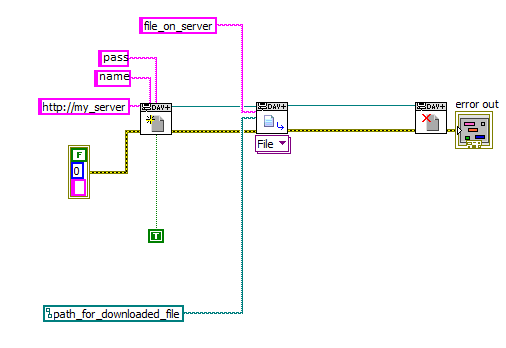
I'm trying to connect my web server (QNAP NAS TS-251) using WebDAV. Using the unsecured way, everything works fine and I'm able to get file from the server:
Problem appears when I try to connect using SSL WebDAV connection. Get.vi produces error 363506 which means, something is wrong with certificate. Firstly, I gave the default certificate provided by QNAP. Secondly, I tried to make my own certificate using OpenSSL. Both ways ending with the same error:
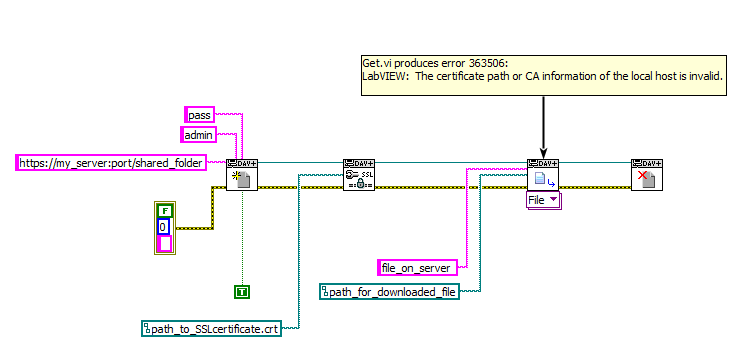
I'm using LV 2015 SP1 (32-bit). Thanks for any ideas 🙂
 ijustlovemath
07-31-2016 09:29 PM
- Mark as New
- Bookmark
- Subscribe
- Mute
- Subscribe to RSS Feed
- Permalink
- Report to a Moderator
Have you tried highlighting execution to see where the error actually occurs?
08-01-2016 09:27 AM
- Mark as New
- Bookmark
- Subscribe
- Mute
- Subscribe to RSS Feed
- Permalink
- Report to a Moderator
Yes, I did. The error occured exactly in Get.vi. Anyway....
I have learned, that when using self-signed certificate, "verify server" option needs to be set to False. Moreover, there don´t need to be any certificate provided, because you simply can´t verify certificate, which isn´t signed by third authority.
With this setting, the communication is secure, but the security level depends on your password (connected to name).
