- Subscribe to RSS Feed
- Mark Topic as New
- Mark Topic as Read
- Float this Topic for Current User
- Bookmark
- Subscribe
- Mute
- Printer Friendly Page
Trusted Devices popup
Solved!
 RRRRSSSS
02-24-2021 01:42 PM - edited 02-24-2021 02:16 PM
- Mark as New
- Bookmark
- Subscribe
- Mute
- Subscribe to RSS Feed
- Permalink
- Report to a Moderator
LV2020 Windows 7
when installing the application I get a bunch of windows security popup i need to acknowledge.
This is my first Lv2020 just changed from 2017, not my first installer.
I did select this option when installing LV2020:

How do I get rid of the message?

Solved! Go to Solution.

 RavensFan

02-24-2021 01:45 PM
- Mark as New
- Bookmark
- Subscribe
- Mute
- Subscribe to RSS Feed
- Permalink
- Report to a Moderator
Okay.
So do you have a question here?
02-24-2021 02:00 PM - edited 02-24-2021 02:03 PM
- Mark as New
- Bookmark
- Subscribe
- Mute
- Subscribe to RSS Feed
- Permalink
- Report to a Moderator
How do I get rid of the popup during installation?
I just canceled the second attempt at installing my App.
After about 10 popup's it does not show any more progress in the progress bar hangs, 1st time was 96% second time 68% 30 minutes I acknolged the popup every minute or so, finally bailed out.
I'm logged in as admin, machine is not on a network.
RavensFan
02-24-2021 02:40 PM
- Mark as New
- Bookmark
- Subscribe
- Mute
- Subscribe to RSS Feed
- Permalink
- Report to a Moderator
What application are you installing?
Is this an installer distributed by NI or one created by a LabVIEW programmer who created an .exe and an installer for it?
02-24-2021 02:44 PM
- Mark as New
- Bookmark
- Subscribe
- Mute
- Subscribe to RSS Feed
- Permalink
- Report to a Moderator
One created by a LabVIEW programmer ( me) and I created the exe and installer.
RavensFan
02-24-2021 02:50 PM
- Mark as New
- Bookmark
- Subscribe
- Mute
- Subscribe to RSS Feed
- Permalink
- Report to a Moderator
Did you add additional installers to the installer when you created it?
What happens if instead of cancelling it, you just allow it to install what it wants to install?
02-24-2021 02:55 PM
- Mark as New
- Bookmark
- Subscribe
- Mute
- Subscribe to RSS Feed
- Permalink
- Report to a Moderator
Yes additional installers were added, ni-serial, ni-visa, nimax runtime with config support.
It will not finish the installation, just keeps popping up the trusted devices message, progress bars never move, acknowledge popup, it flashes the progress bars but they don't gain any percentages, popup comes up again, acknowledges again repeat for 30 minutes , that is my limit .
RavensFan
02-24-2021 03:11 PM
- Mark as New
- Bookmark
- Subscribe
- Mute
- Subscribe to RSS Feed
- Permalink
- Report to a Moderator
Did you plug in some NI hardware before you installed the software?
I've never seen this message before, but it seems to be something that would occur if you plugged in hardware and it is looking for device drives that aren't installed. Probably DAQmx, but knowing possibly something else.
If you have something plugged in, take it out and try again.
If that fails, try creating a new installer, that only installs the .exe and the LabVIEW run-time engine and no other additional software or drivers.
See if that succeeds then try installing the other stuff via NI Package Manager, one at a time, you might have to download drivers from the NI website (because a little while ago, NI took the browse for products option have of VI Package Manager.)
02-24-2021 03:19 PM
- Mark as New
- Bookmark
- Subscribe
- Mute
- Subscribe to RSS Feed
- Permalink
- Report to a Moderator
hangs at 2% now , cleared the popup 6 times at this point
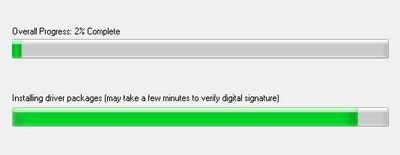
First time PCIe-xxxx DAQ card was not installed, round 2 and 3 had it plugged installed, never had to remove a DAQ card before to install software.
Computer is not on a network so downloading is not gonna work.
swapped everything back to the win 10 computer ,installer worked but this computer also had the development system on it, so zero confidiance in it working on a clean machine.
RavensFan
02-24-2021 05:02 PM
- Mark as New
- Bookmark
- Subscribe
- Mute
- Subscribe to RSS Feed
- Permalink
- Report to a Moderator
I wasn't thinking of so much a PCI card, but a USB device being plugged in and causing plug and play issues. Like a new USB device, Window says "let me go find drivers for that!"
Good luck!
