- Subscribe to RSS Feed
- Mark Topic as New
- Mark Topic as Read
- Float this Topic for Current User
- Bookmark
- Subscribe
- Mute
- Printer Friendly Page
STL geometry object

 Kiran@
06-08-2023 07:04 AM
- Mark as New
- Bookmark
- Subscribe
- Mute
- Subscribe to RSS Feed
- Permalink
- Report to a Moderator
Hello,
I am LabVIEW developer and i am new to the STL geometry coding.
I have load the STL image in the LabVIEW. i am giving the constant value to the rotate X and Y axis vi. still STL geometry image is flickering (Unsteadily) Ideally it should be at constant position. is any one knows the reason behind this ? or am I missing something.
Thanks in advance
Kiran@

 LVNinja
06-08-2023 09:48 AM
- Mark as New
- Bookmark
- Subscribe
- Mute
- Subscribe to RSS Feed
- Permalink
- Report to a Moderator
can you share some of the code ? in lv 2020 pls ?
06-09-2023 06:11 AM
- Mark as New
- Bookmark
- Subscribe
- Mute
- Subscribe to RSS Feed
- Permalink
- Report to a Moderator
I don't have LV 2020 installed on my PC. So here is simple LV code which I have developed and sometimes its working Okay. but after sometimes image start to flicker (Unsteadily)
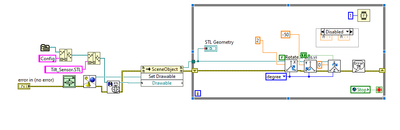
Flickering video I have uploaded on the below link.
https://screenrec.com/share/hVXdtIMgGN

 Intaris

06-09-2023 07:03 AM
- Mark as New
- Bookmark
- Subscribe
- Mute
- Subscribe to RSS Feed
- Permalink
- Report to a Moderator
Do you want to continually rotate the device at a rate of 1kHz?
Or do you want to set a constant rotation value?
Your code is performing a rotate function every 1ms. Obviously, unless you have a very fast PC and extremely fast monitor, you're not going to see all of these. What you are seeing is a snapshot of your object's position whenever a screen refresh is happening. If anything, I'm surprised it's so repeatable.
Try using "Set rotation" instead of "Rotate" and slow down the loop by a factor of 20 or so. i.e. wait on ms with 20ms set. This is still a 50Hz update rate.
