- Subscribe to RSS Feed
- Mark Topic as New
- Mark Topic as Read
- Float this Topic for Current User
- Bookmark
- Subscribe
- Mute
- Printer Friendly Page
Problem with LabVIEW function
Solved!
 johnsold
09-01-2010 12:32 PM - edited 09-01-2010 12:36 PM
- Mark as New
- Bookmark
- Subscribe
- Mute
- Subscribe to RSS Feed
- Permalink
- Report to a Moderator
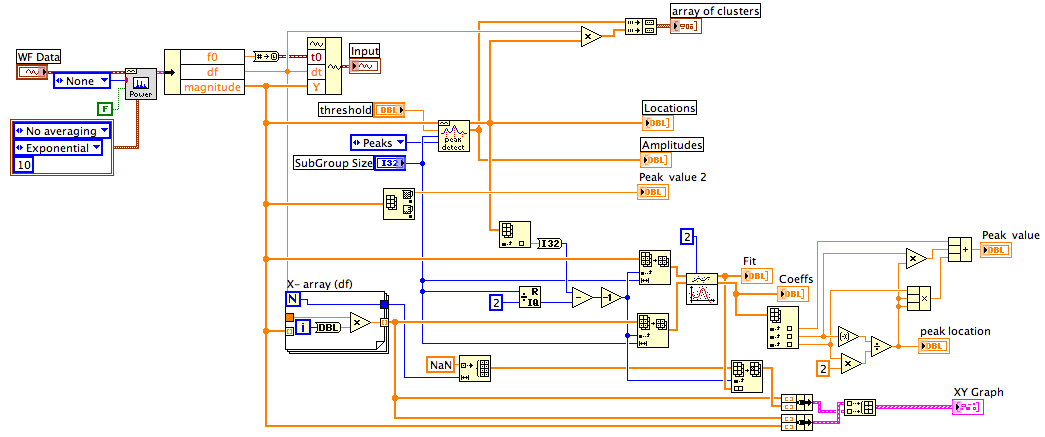
I just noticed that!....
I was modifying my VI to allow manual selection of the center of the subset when I noticed that.
Lynn
p.s. Saving to previous from LV2010 to LV8.0 resulted in an error because the polynomial order input is on a different connector pane terminal in the earlier versions.


09-01-2010 10:51 PM
- Mark as New
- Bookmark
- Subscribe
- Mute
- Subscribe to RSS Feed
- Permalink
- Report to a Moderator
@Intaris wrote:
Of course it's a problem. If you read it again carefully you'll see that I'm supporting your idea that it might be returning bad values.
I've told you before as to the WHY..... You need detailed information about the algorithm to answer that. You won't get that from a non-NI poster so please bear that in mind for the further posts.
As for Pt 3 I examined the points in full detail. I even overlayed the smoothed (quadratic fit function) over the points ans I have to say that the first peak returned for widths 3 and 4 are more than 4 actual data points off the "real" peak. Since this is outside the actual window you are defining, this cannot be described as "smoothing". It's a wrong result (in your definition).
What has me a but confused is that on the one hand you're willing to accept a willy-nilly definition of a "correct" peak (Pt 3) yet on the other hand demanding absolute rigorous results from an algorithm being used with massively sub-optimal parameters. Something has to give.
Shane
1. ok, I might have mis-intepreted.
2. I'm not expecting that from a non NI-poster. Actually I would expect NI to give a reply. I'm also not asking you "why".
I'm just highlight that my original post is to ask "Why". Please read in context..
3. I'm not going to discuss further on "what is" or "should be" the real peak. What I'm concerned is, is the VI delivering the result that it is SUPPOSED to?
4. What I'm expecting is, the VI should give the result that it is supposed to. And I feel that it is not supposed to miss the peak at around 10.5kHz.
Please read my original post carefully.. My concern is, is there a bug?
It's not a matter of compromising or unrealistic expectations.
09-01-2010 11:02 PM
- Mark as New
- Bookmark
- Subscribe
- Mute
- Subscribe to RSS Feed
- Permalink
- Report to a Moderator
@Intaris wrote:
I haven't missed anything. Trust me. If you want to get further with your problem, listen a bit more closely. We are trying to teach others here.
Using small width should potentially result in more peaks, but not miss the detection of a peak. While this may make human logical sense, it is simply not accurate.
That's all I have to say at the moment to this topic. I have already hinted at the fact that I suspect there MAY be funny things going within the algorithm but the only person who can confirm or deny that is someone with access the the source code of the algorithm.
Shane.
Hi Shane,
i just want to say that, I'm willing to listen. The thing is, some of the replies are like "just use bigger width" as workaround as simply avoid the problem.
The problem is, if we're not aware of the root cause, how can we be sure if or when the problem might surface? that is my concern.
You have given some examples in this post and that is the type of answer that I'll like to read.. and maybe we can study how that "error" might happen.
I appreciate that you might agree that there may be something funny within the algorithm.. That why we need NI to clarify on this.. Is there or is there not, a BUG?
Isn't it any programmer's concern that there maybe a bug in the functions they use?
09-01-2010 11:15 PM
- Mark as New
- Bookmark
- Subscribe
- Mute
- Subscribe to RSS Feed
- Permalink
- Report to a Moderator
@johnsold wrote:
I plot both the original data and the fitted polynomial on the same graph.
Run this with values of the SubGroup Size ranging from 3 to >30. Once you get above 9 or 10 the fit looks very good and the peak location and the peak amplitude change very little as the Size changes. At Size = 5 the fit does not works because the Peak detector does not find the 10583 peak.
Lynn
Hi Lynn, thanks for the effort.. Maybe I'll try it also..
by the way, does it show why the peak was detected at 12.3kHz region? Also, with width = 5, none of the fitted curves have a maxima?

 Intaris

09-02-2010 02:40 AM
- Mark as New
- Bookmark
- Subscribe
- Mute
- Subscribe to RSS Feed
- Permalink
- Report to a Moderator
@Limsg wrote:
Hi Shane,
i just want to say that, I'm willing to listen. The thing is, some of the replies are like "just use bigger width" as workaround as simply avoid the problem.
The problem is, if we're not aware of the root cause, how can we be sure if or when the problem might surface? that is my concern.
You have given some examples in this post and that is the type of answer that I'll like to read.. and maybe we can study how that "error" might happen.
I appreciate that you might agree that there may be something funny within the algorithm.. That why we need NI to clarify on this.. Is there or is there not, a BUG?
Isn't it any programmer's concern that there maybe a bug in the functions they use?
I'm happy to hear we're getting somewhere with listening to each other. It makes workign together much easier.
Using too small a window is ALWAYS going to be a problem whether the algorithm is functioning properly or not (Which only NI can answer, I'm not an NI employee). Using a small window is going to result in exactly the type of results you are observing. Whether is can correctly account for exactly the set of results you're getting for exactly this set of input data is not something I have the capability to answer conclusively.
And yes, of course we're concerned about bugs in the software we use. I have even started an idea on the Idea Exchange for a long-term support version of LabVIEW because of exactly this type of thing.
But I re-iterate for the last time. You need to contact NI about finding out if this is a bug in the peak-fit code (This means filing a bug report HERE).
Shane.
johnsold
09-02-2010 08:10 AM
- Mark as New
- Bookmark
- Subscribe
- Mute
- Subscribe to RSS Feed
- Permalink
- Report to a Moderator
Limsg,
1. The peak at 12.3 kHz is "real." If you look closely at the data expanded about that point( ~12335-12365 and 12735-12755), you will see that the noise at those points looks like peaks of width 3 to 5. Once the width is >=6 those noise-derived peaks disappear. The multiplicity of detection around the desired peaks at 10.5, 18.3, 20.2 and 23.8 kHz are all due to noise on the signal. For widths >9 the three lower peaks become singly detected peaks. The width needs to be >=29 before the peak at 23.8 stops showing noise effects. This is why the help file for the peak detector recommends adjusting the width based you your data. Peak detection in the presence of noise is always a judgement call.
2. With width = 5 the first peak detected is the one at 12.7 kHz. The program fits a curve to that data but it does not show on the graph because I fixed the X-axis around the 10.5 kHz curve. If you change the axes to look at 12710-12760 with the width set to 5 you will see not only that it fit a curve to the points, but that the peak is a negative valley.
Lynn
09-03-2010 02:34 AM
- Mark as New
- Bookmark
- Subscribe
- Mute
- Subscribe to RSS Feed
- Permalink
- Report to a Moderator
Not too sure what criteria they used to define a peak..
"For each set of points, the algorithm performs the least-squares quadratic fit, and then performs a series of tests on the coefficients to see whether they meet the criteria for a peak. The function checks whether each parabola is at a local maximum, determines the sign of the quadratic coefficient, which indicates the parabola’s concavity, and finally checks that the peak is above the designated threshold."
I tested the range from 10.5kHz to 10.65kHz, using subgroup 5 and applying curve fitting.
From the attached picture, it can be seen that there is 6 instances where the fitted curve contains a maxima (Blue dot) within the subgroup. But the peak detection VI doesn't indicate a peak.
At the bottom of the picture, is at the region 12.7kHz.. similarly, the fitted curve contains a maxima and the peak detection VI returns a peak.
Why the result so inconsistent.........? Anyone can answer that question..?
Thanks.
 johnsold
09-03-2010 07:36 AM
- Mark as New
- Bookmark
- Subscribe
- Mute
- Subscribe to RSS Feed
- Permalink
- Report to a Moderator
I agree that the documentation does not specify the "criteria for a peak." Without that information we are all guessing.
Let's hope one of NI's Applications Engineers is monitoring this thread and will provide that information.
Lynn
09-07-2010 10:22 PM
- Mark as New
- Bookmark
- Subscribe
- Mute
- Subscribe to RSS Feed
- Permalink
- Report to a Moderator
Email to NI support with the contents of the 1st post, and below is their reply...
Is it my English difficult to understand.. Ask them why the function failed to detect a peak and their reply was why the peak location is not an integer.... Also, their reply totally doesn't address/answer the question..
I noticed that all too often, the customer support is only capable of "copying and pasting" contents from the help file w/o analysis and studying the problems faced by users..
What do you guys feel of the reply below..?
"Thank you for your email and I would be assisting you with your query. Refering to the Labview help for the peak detection function, it states that the location node contains the index locations of all peaks or valleys detected in the current block of data. Because the peak detection algorithm uses a quadratic fit to find the peaks, it actually interpolates between the data points. Therefore, the indexes are not integers. In other words, the peaks found are not necessarily actual points in the input data but may be at fractions of an index and at amplitudes not found in the input array. This behavior is seen prominently in the example VI (Peak detection and display.vi) within "labview\examples\analysis\peakxmpl.llb". We can see that when the PD width is increased, the detected peaks fall out of the input waveform and are NOT actual data points.
Also from the help file, the width node (subgroup size) specifies the number of consecutive data points to use in the quadratic least squares fit. Width is coerced to a value greater than or equal to 3. The value should be no more than about 1/2 of the half-width of the peaks/valleys and can be much smaller (but > 2) for noise-free data. Large widths can reduce the apparent amplitude of peaks and shift the apparent location. Therefore, the subgroup size of 5 is not optimum to detect the peaks and should be changed to a value that is lesser than 5. "
Intaris
09-08-2010 01:47 AM - edited 09-08-2010 01:49 AM
- Mark as New
- Bookmark
- Subscribe
- Mute
- Subscribe to RSS Feed
- Permalink
- Report to a Moderator
Completely unsatisfactory answer IMHO.
I would try again but try to make your description fool-proof. If you say you're not happy with the answer, it might get passed on to someone who knows a bit more about it.
Shane
Ps Also changing the window to less than 5 is completely wrong.
