Turn on suggestions
Auto-suggest helps you quickly narrow down your search results by suggesting possible matches as you type.
Showing results for
Topic Options
- Subscribe to RSS Feed
- Mark Topic as New
- Mark Topic as Read
- Float this Topic for Current User
- Bookmark
- Subscribe
- Mute
- Printer Friendly Page
'OK' Boolean within Subpanel subVI (vs. in main code)?

 DonRoth
Active Participant
08-22-2005 02:45 PM
Options
- Mark as New
- Bookmark
- Subscribe
- Mute
- Subscribe to RSS Feed
- Permalink
- Report to a Moderator
This is my first real need for subpanelling.
I have what I thought was going to be a simple piece of subVI code to implement in a subpanel. (and maybe I do).
The subVI just consists of a radio button dialog (see attached) with the idea that I want to get the choice from the user and feed it to the main program AFTER the user presses 'OK' (the 'OK' boolean is within the subVI).
The way I tried to address this was to use an invoke node 'Get Control Value' from the control with control name 'Method?'.
The only thing is that the invoke node executes without waiting for the 'OK' boolean to be pressed which under normal run circumstances is requeired prior to the while loop of the subVI being exited.
The subpanel examples I saw have booleans such as 'STOP' buttons in the main code and not in the subVI. Is this the way I will have to do this or is there a way to do what I want (and it is obvious but just have not figured it out).
Thanks,
Don
I have what I thought was going to be a simple piece of subVI code to implement in a subpanel. (and maybe I do).
The subVI just consists of a radio button dialog (see attached) with the idea that I want to get the choice from the user and feed it to the main program AFTER the user presses 'OK' (the 'OK' boolean is within the subVI).
The way I tried to address this was to use an invoke node 'Get Control Value' from the control with control name 'Method?'.
The only thing is that the invoke node executes without waiting for the 'OK' boolean to be pressed which under normal run circumstances is requeired prior to the while loop of the subVI being exited.
The subpanel examples I saw have booleans such as 'STOP' buttons in the main code and not in the subVI. Is this the way I will have to do this or is there a way to do what I want (and it is obvious but just have not figured it out).
Thanks,
Don

 tbob
tbob
Trusted Enthusiast
08-22-2005 03:20 PM - edited 08-22-2005 03:20 PM
Options
- Mark as New
- Bookmark
- Subscribe
- Mute
- Subscribe to RSS Feed
- Permalink
- Report to a Moderator
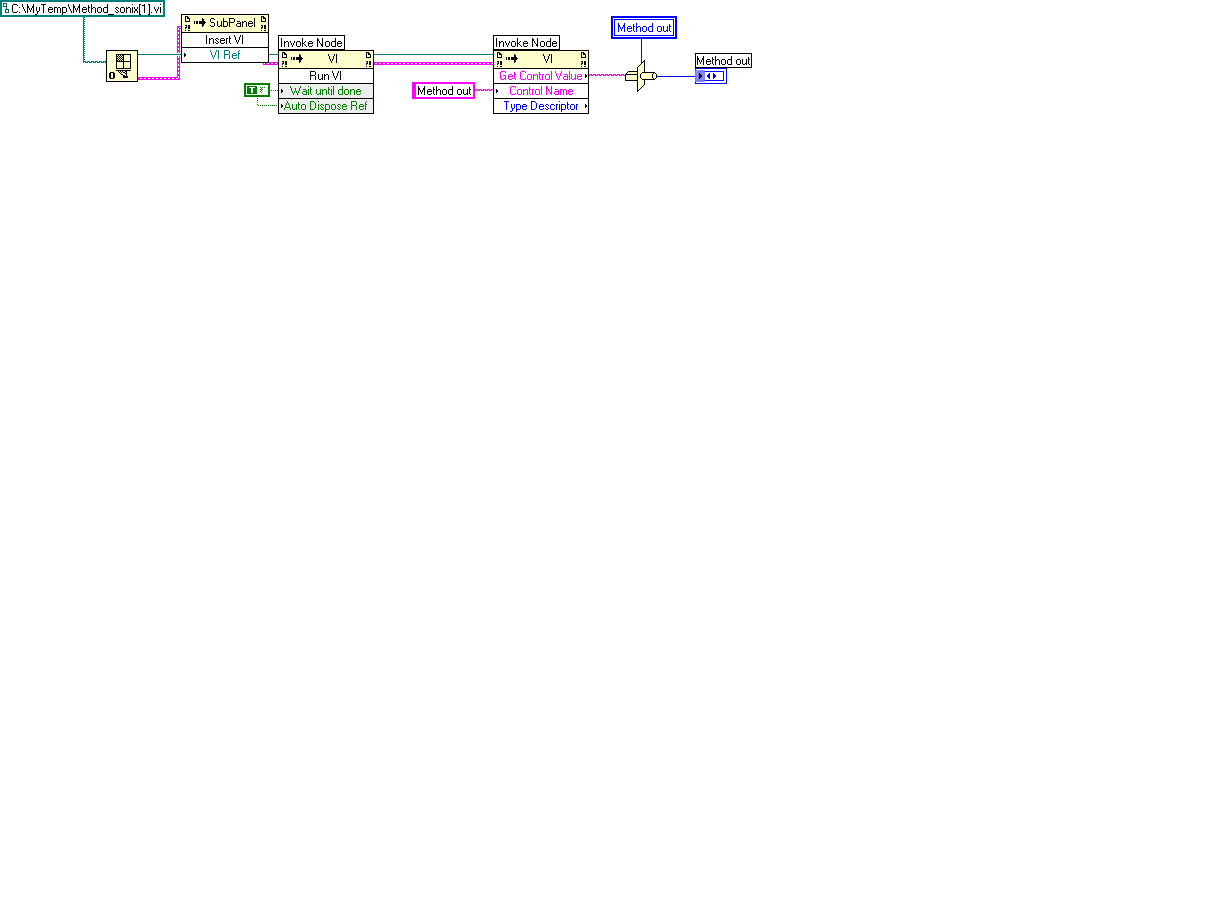
This is what your main code should look like. The key is to wire a True to the Wait until done in the 1st Invoke Node.
Message Edited by tbob on 08-22-2005 02:22 PM

08-22-2005 03:51 PM
Options
- Mark as New
- Bookmark
- Subscribe
- Mute
- Subscribe to RSS Feed
- Permalink
- Report to a Moderator
Beautiful....that works great. I was trying to follow the
included LabVIEW example \subpanel.llb\simple.vi where they state to
"Run the VI before insertion."
Much obliged.
Sincerely,
Don
Much obliged.
Sincerely,
Don
