- Subscribe to RSS Feed
- Mark Topic as New
- Mark Topic as Read
- Float this Topic for Current User
- Bookmark
- Subscribe
- Mute
- Printer Friendly Page
Need help understanding TDMS usage

 mcduff
04-30-2014 08:27 AM
- Mark as New
- Bookmark
- Subscribe
- Mute
- Subscribe to RSS Feed
- Permalink
- Report to a Moderator
I had the same problem, the snippet I posted should help. Below is the story ...
I was importing into Excel and Excel was not making a time axis even though I specified one with dt, t0, etc. I created a test TDMS file using LabVIEW's built in tools, it imported the time axis correctly into Excel. I looked at its waveform properties and started to delete them one by one untilI still had what I wanted. (That is the variant array in the snippet.) I do believe you need to set each channel separately, but they can be in the same group. Try the snippet.
Cheers,
mcduff

04-30-2014 08:32 AM
- Mark as New
- Bookmark
- Subscribe
- Mute
- Subscribe to RSS Feed
- Permalink
- Report to a Moderator
Why does the little TDMS FILE VIEWER do such a better job than the full-blown Diadem?
I have a loop that generates two WAVEFORMs, but I gave one a different START time than the other.
TDMS VIEWER shows it like this: if I plot the GROUP:
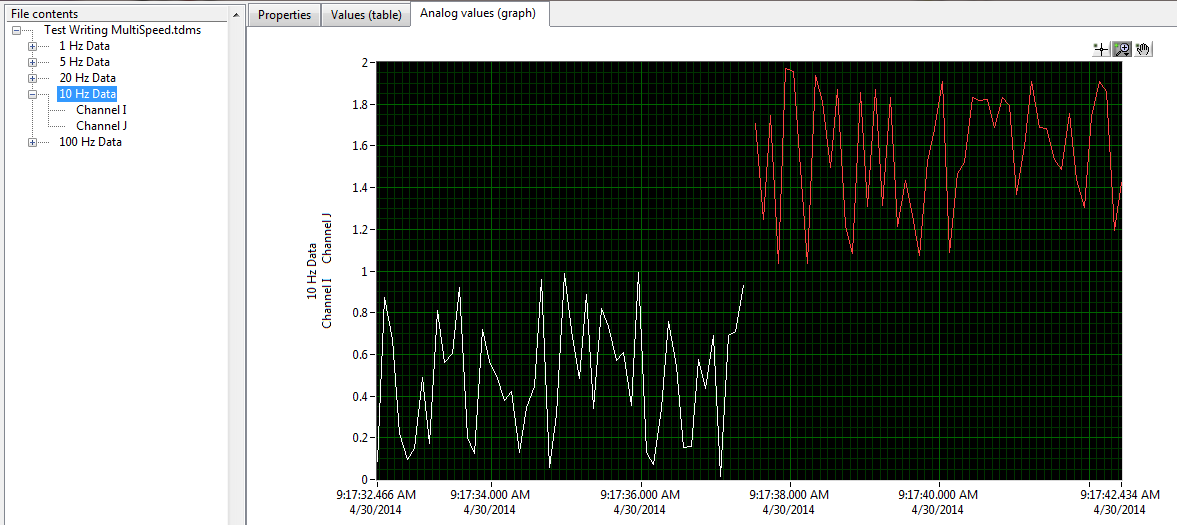
That's exactly what I would expect.
So why can't Diadem do that?

Culverson Software - Elegant software that is a pleasure to use.
Culverson.com
Blog for (mostly LabVIEW) programmers: Tips And Tricks
04-30-2014 08:34 AM
- Mark as New
- Bookmark
- Subscribe
- Mute
- Subscribe to RSS Feed
- Permalink
- Report to a Moderator
I do believe you need to set each channel separately, but they can be in the same group. Try the snippet.
I'll try the snippet. But if you have to set up each channel separately, then what are groups for ?
Culverson Software - Elegant software that is a pleasure to use.
Culverson.com
Blog for (mostly LabVIEW) programmers: Tips And Tricks
04-30-2014 08:37 AM
- Mark as New
- Bookmark
- Subscribe
- Mute
- Subscribe to RSS Feed
- Permalink
- Report to a Moderator
Try the snippet.
Your point is that ALL of those properties are necessary to get Diadem (excel I don't care about) to work properly?
I wonder if that's documented somewhere...
Anyway, I'll try.
Culverson Software - Elegant software that is a pleasure to use.
Culverson.com
Blog for (mostly LabVIEW) programmers: Tips And Tricks
mcduff
04-30-2014 09:46 AM
- Mark as New
- Bookmark
- Subscribe
- Mute
- Subscribe to RSS Feed
- Permalink
- Report to a Moderator
I do each channel separately, have not tried for a whole group. I only have one group, but may have different time scales. There is a property NI_ExpXDimension that needs to be set to the string "t" for time or "f" for frequency. I am guessing that this is the key property for making an implicit x scale.
mcduff
mcduff
04-30-2014 09:56 AM
- Mark as New
- Bookmark
- Subscribe
- Mute
- Subscribe to RSS Feed
- Permalink
- Report to a Moderator
ALL of those properties are necessary to get Diadem (excel I don't care about) to work properly?
I do not care about Excel either, but, if NI's addon cannot import the TDMS correctly, then I am not saving it right. Try the following vi with Diadem, (I do not have it), see if it has the properties you want then extract the waveform properties to build your own.
mcduff

04-30-2014 10:24 AM
- Mark as New
- Bookmark
- Subscribe
- Mute
- Subscribe to RSS Feed
- Permalink
- Report to a Moderator
I am guessing that this is the key property for making an implicit x scale.
Apparently not. I used all the properties except "wf_samples" from your list, and got no change in behavior:
NI_ExpIsRelativeTime = FALSE (you had it as "TRUE")
wf_time_pref = "absolute" (you had it as "relative").
NI_ExpXDimension = "t"
wf_xname = "time"
wf_xunit_string = "Sec" (you had it as "s").
None of that makes a difference. The FILE VIEWER thing shows it correctly (staggered times, X-axis = time of day), but Diadem does not (it shows unstaggered times, 0-10).
I don't know what to use for "wf_samples", the other one you specified. I am writing to the file one sample at a time, I don't know how many there will be.
If I use "wf_samples" = 1, then the FILE VIEWER shows me the overlapping (non-staggered) X-axis. The start time is correct for one channel, but they should be staggered and they're not.
That same file, if I look at the group in Diadem, it just draws a blank. It clears the scales, the gridlines, makes a pure white rectangle with no data.
I tried "wf_samples" = 2, thinking there were two channels in the group, but the same result.
I took out the "wf_samples" = 2 altogether, and it's back to where the FILE VIEWER is good, but Diadem is not.
Culverson Software - Elegant software that is a pleasure to use.
Culverson.com
Blog for (mostly LabVIEW) programmers: Tips And Tricks
mcduff
04-30-2014 10:31 AM
- Mark as New
- Bookmark
- Subscribe
- Mute
- Subscribe to RSS Feed
- Permalink
- Report to a Moderator
wf_samples–This property represents the number of samples in the waveform.
It may be the Diadem cannot measure the length of the data array; maybe write this property at the end of the data run. What happens if you set it to the correct value?
Sorry none of this has helped.
mcduff
04-30-2014 10:38 AM
- Mark as New
- Bookmark
- Subscribe
- Mute
- Subscribe to RSS Feed
- Permalink
- Report to a Moderator
I set "wf_samples" to 50 and got the same results. It screws up the FILE VIEWER and Diadem shows a blank plot.
Thanks for your efforts. I'm trying the WRITE TO MEASUREMENT FILE idea now. though I've never used the express stuff so it's weird to me.
Culverson Software - Elegant software that is a pleasure to use.
Culverson.com
Blog for (mostly LabVIEW) programmers: Tips And Tricks
mcduff
04-30-2014 10:44 AM
- Mark as New
- Bookmark
- Subscribe
- Mute
- Subscribe to RSS Feed
- Permalink
- Report to a Moderator
I've never used the express stuff so it's weird to me.
Just use it as a diagnostic. You can right-click it to see the VI behind the scenes, "Open Front Panel", just do not save it. (It will ask you to convert it, just convert and do not save.)
mcduff
