- Subscribe to RSS Feed
- Mark Topic as New
- Mark Topic as Read
- Float this Topic for Current User
- Bookmark
- Subscribe
- Mute
- Printer Friendly Page
Match Regular Expression does not match what Match Pattern does
Solved!
 RobCole
09-23-2011 10:02 AM
- Mark as New
- Bookmark
- Subscribe
- Mute
- Subscribe to RSS Feed
- Permalink
- Report to a Moderator
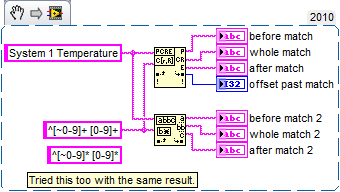
I have read through a lot of posts about how Match Pattern does not match what Match Regular Expression will due to not processing some characters.
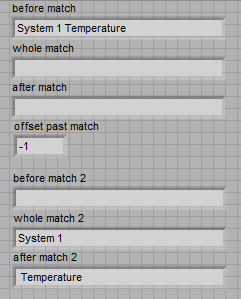
However, I found a problem with the other way. A simple Reg-Ex that works in Match Pattern but not Match Regular Expression.
What I have here is just an example. I want to use Match Regular Expression so I can specify some sub-matches.
The reg-ex is for: one or more non-numeric characters, a space, one or more numeric characters. At the start of the string.
How can I get this working in Match Regular Expression? I am working in LabVIEW 2010f2 32 bit. Here is the code snippet and the results:
Rob
Solved! Go to Solution.

 Darin.K
09-23-2011 10:29 AM
- Mark as New
- Bookmark
- Subscribe
- Mute
- Subscribe to RSS Feed
- Permalink
- Report to a Moderator
One of the subtle differences is the negation operator for character classes. In Match Pattern it is ~, but for Match RegEx it is ^.
09-23-2011 10:35 AM
- Mark as New
- Bookmark
- Subscribe
- Mute
- Subscribe to RSS Feed
- Permalink
- Report to a Moderator
@Darin.K wrote:
One of the subtle differences is the negation operator for character classes. In Match Pattern it is ~, but for Match RegEx it is ^.
Thank you Darin. I missed that little difference in the documentation. Everything else looks the same.
I think I prefer the ~ for negation since ^ is also used for beginning of the string. But we work with what we have.
Rob
Darin.K
09-23-2011 11:46 AM
- Mark as New
- Bookmark
- Subscribe
- Mute
- Subscribe to RSS Feed
- Permalink
- Report to a Moderator
@Robert Cole wrote:
I think I prefer the ~ for negation since ^ is also used for beginning of the string. But we work with what we have.
Let me offer you a tip and perhaps defend the honor of the regex a little bit. One of my favorite features of regexes is the ability to specify character classes (and their negation). One of the reasons I have to think about the ~ versus ^ is that I rarely use ^ in a regex alternative.
Some examples:
[0-9] = \d (digit)
[^0-9] = \D (not a digit)
The equivalent regex for your case is: \D+ \d+
