- Subscribe to RSS Feed
- Mark Topic as New
- Mark Topic as Read
- Float this Topic for Current User
- Bookmark
- Subscribe
- Mute
- Printer Friendly Page
LabVIEW PID controlled PWM output
Solved!
 lv_user_bs
07-23-2017 05:38 AM
- Mark as New
- Bookmark
- Subscribe
- Mute
- Subscribe to RSS Feed
- Permalink
- Report to a Moderator
Dear All,
I need to control the heater with set temperature. My idea is to use PID control which can output duty cycle percentage and in-turn generate the PWM signal to control the SSR using single board RIO with 1 KHz frequency.
I have searched the forum for previous post. But unfortunate to find right one, most of them uses DAQ to generate variable duty cycle PWM output. Hence am using RIO digital I/O line in RT, am not familiar on how to proceed.
I would be happy to see the replies.
Solved! Go to Solution.

 JanBarton
07-23-2017 08:42 AM
- Mark as New
- Bookmark
- Subscribe
- Mute
- Subscribe to RSS Feed
- Permalink
- Report to a Moderator
Hi,
you can use attached vi and link the output to Digital Output port of RT. The vi has two inputs: "PID output (%)" which you connect to your PID controller and "PWM period (sec)" which specifies the lenght of PWM period. For heater I ussualy set something between 3 to 10sec. For better resolution I usually use heater with more heating elements and split PWM into more parts.
BR, Jan
07-23-2017 08:53 AM
- Mark as New
- Bookmark
- Subscribe
- Mute
- Subscribe to RSS Feed
- Permalink
- Report to a Moderator
Hi,
@JanBarton wrote:
Hi,
you can use attached vi and link the output to Digital Output port of RT. The vi has two inputs: "PID output (%)" which you connect to your PID controller and "PWM period (sec)" which specifies the lenght of PWM period. For heater I ussualy set something between 3 to 10sec. For better resolution I usually use heater with more heating elements and split PWM into more parts.
BR, Jan
Thanks for reply. Attached vi is protected, if don't mind can you share the password.
JanBarton
07-23-2017 11:25 AM
- Mark as New
- Bookmark
- Subscribe
- Mute
- Subscribe to RSS Feed
- Permalink
- Report to a Moderator
Sorry, my fault 🙂
Here you are
BR,Jan
07-23-2017 12:10 PM
- Mark as New
- Bookmark
- Subscribe
- Mute
- Subscribe to RSS Feed
- Permalink
- Report to a Moderator
Hi JanBarton,
Thanks for your time. Can you please help me out to understand the logic because am new to this.
JanBarton
07-24-2017 09:31 AM
- Mark as New
- Bookmark
- Subscribe
- Mute
- Subscribe to RSS Feed
- Permalink
- Report to a Moderator
Hi,
it is easy. A simple sawtooth signal is built representing a value from 0-100 of period time. This signal is compared to wanted output value. If the value is higher than the current value of sawtooth signal the output is high. See fig.2 on this webpage https://en.wikipedia.org/wiki/Pulse-width_modulation
BR,
Jan
 nad99
nad99
07-16-2019 01:50 PM
- Mark as New
- Bookmark
- Subscribe
- Mute
- Subscribe to RSS Feed
- Permalink
- Report to a Moderator
hello sir
Can you make a screenshot of the code ?
because i have labview 2015.
thank you

 GerdW
GerdW

07-16-2019 02:31 PM - edited 07-16-2019 02:33 PM
- Mark as New
- Bookmark
- Subscribe
- Mute
- Subscribe to RSS Feed
- Permalink
- Report to a Moderator
Hi nad,
Can you make a screenshot of the code ?
I took the liberty to simplify the VI a little bit:
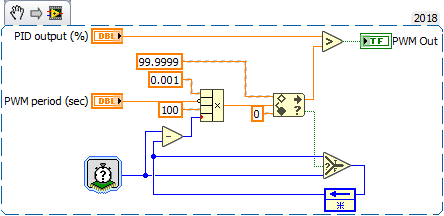
GerdW
using LV2016/2019/2021 on Win10/11+cRIO, TestStand2016/2019
nad99
07-17-2019 04:20 AM
- Mark as New
- Bookmark
- Subscribe
- Mute
- Subscribe to RSS Feed
- Permalink
- Report to a Moderator
Thank you !
Another question : In tick counter, why do use ms like counter units ?
I think it's good if you use ticks unit.
and why do you multiply the result of substraction by 0.001 ?
GerdW
07-17-2019 04:27 AM - edited 07-17-2019 04:27 AM
- Mark as New
- Bookmark
- Subscribe
- Mute
- Subscribe to RSS Feed
- Permalink
- Report to a Moderator
Hi nad,
In tick counter, why do use ms like counter units ?
The OP decided to use that VI (most probably) on a RT target, with using a millisecond tick counter…
I think it's good if you use ticks unit.
Depends on the target you want to run that code on…
and why do you multiply the result of substraction by 0.001 ?
Because the control is named "PWM period (sec)" and your tick counter gives ms: there's a conversion factor of 1000 between both units…
GerdW
using LV2016/2019/2021 on Win10/11+cRIO, TestStand2016/2019
