- Subscribe to RSS Feed
- Mark Topic as New
- Mark Topic as Read
- Float this Topic for Current User
- Bookmark
- Subscribe
- Mute
- Printer Friendly Page
LabVIEW Help Problem: Shortcut Menu Selection (User) Event glitches

 X.
X.
05-07-2014 03:47 PM - edited 05-07-2014 03:49 PM
- Mark as New
- Bookmark
- Subscribe
- Mute
- Subscribe to RSS Feed
- Permalink
- Report to a Moderator
I may have opened a Pandora box here, but after a short look, it seems that the whole help file is bogus, as far as Shortcut Menu are concerned.
I was initially interested in understanding what were the items I have access to when a user right-clicks on a Tab Control:
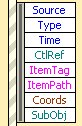
So I fired up the Help and typed in "SubObj".
I got this:
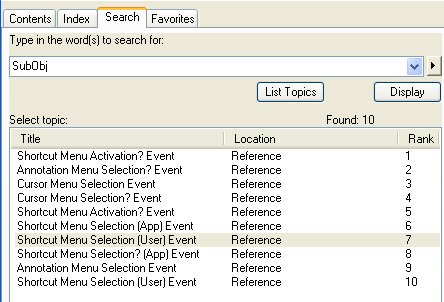
Which one is relevant is at first sight impossible to figure, so I had a look at all of them. I eventually focused on the "Control" class, which after all a Tab belongs to.
Here is a snapshot of the Help page (which you can also find here:
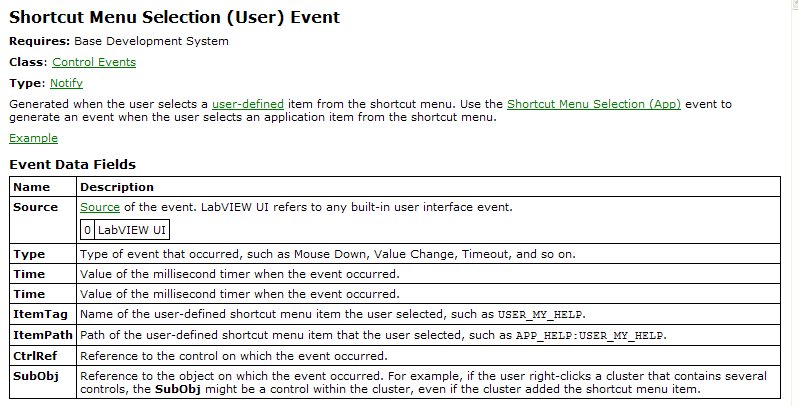
A quick look shows that:
- the item "Time" is duplicated
- the item "Coords" is missing
Moreover, it appears that all the hits above have the same problem: two "Times", no "Coords".
The only one that departs somewhat from that pattern is this one:
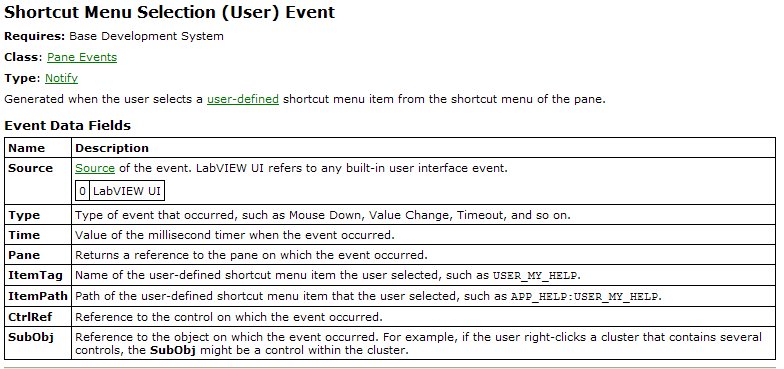
Note that it is still missing its "Coords" item.
Nothing critical, but when Spring cleaning time arrives, worth having a look into...
- Tags:
- X_Bug_Report

05-08-2014 03:31 PM
- Mark as New
- Bookmark
- Subscribe
- Mute
- Subscribe to RSS Feed
- Permalink
- Report to a Moderator
Thank you for bringing this to our attention. I have submitted Corrective Action Request #470580 to our developers.
- Tags:
- CAR_470580
