- Subscribe to RSS Feed
- Mark Topic as New
- Mark Topic as Read
- Float this Topic for Current User
- Bookmark
- Subscribe
- Mute
- Printer Friendly Page
Integer Number ( Help )!!!!

 xxxzoo122
08-29-2015 09:21 PM
- Mark as New
- Bookmark
- Subscribe
- Mute
- Subscribe to RSS Feed
- Permalink
- Report to a Moderator
Hello
I need help from one of you guys which is how can I do a LED light works when I use integer numbers like ( 1, or any integer value ), and turns off when I use non-integer numbers like ( 0.6, or any non-integer value )
Thank for any help...

 RavensFan

08-29-2015 09:23 PM
- Mark as New
- Bookmark
- Subscribe
- Mute
- Subscribe to RSS Feed
- Permalink
- Report to a Moderator
Compare the number to the rounded version of itself.

 billko
08-29-2015 09:28 PM
- Mark as New
- Bookmark
- Subscribe
- Mute
- Subscribe to RSS Feed
- Permalink
- Report to a Moderator
Sounds a lot like this topic. Is this the same calculator?
(Mid-Level minion.)
My support system ensures that I don't look totally incompetent.
Proud to say that I've progressed beyond knowing just enough to be dangerous. I now know enough to know that I have no clue about anything at all.
Humble author of the CLAD Nugget.
08-29-2015 09:34 PM
- Mark as New
- Bookmark
- Subscribe
- Mute
- Subscribe to RSS Feed
- Permalink
- Report to a Moderator
Thank you so much for every one who is trying to help me, but I am new in using this programe this is why I hope from u to give me more explanation,,,,
I use labview 2014
08-29-2015 09:35 PM
- Mark as New
- Bookmark
- Subscribe
- Mute
- Subscribe to RSS Feed
- Permalink
- Report to a Moderator
I do not think so
RavensFan
08-29-2015 09:48 PM
- Mark as New
- Bookmark
- Subscribe
- Mute
- Subscribe to RSS Feed
- Permalink
- Report to a Moderator
Is the number equal to the number when you round it to the nearest integer. Yes? It must be an integer. No? It must not be an integer.

 amitwadje
08-30-2015 01:32 AM
- Mark as New
- Bookmark
- Subscribe
- Mute
- Subscribe to RSS Feed
- Permalink
- Report to a Moderator
hi,
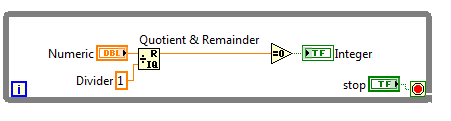
1. Divide your number by 1, use 'Quotient & Remainder' function.
2. If the remainder = 0 then LED is ON otherwise OFF.
Note: Change the data entry if you want it only for positive numbers
See the attached VI.
Amit
CLAD

 altenbach
08-30-2015 01:50 AM - edited 08-30-2015 01:50 AM
- Mark as New
- Bookmark
- Subscribe
- Mute
- Subscribe to RSS Feed
- Permalink
- Report to a Moderator
Of course all this only works well if the number is not derived from a calculation involving fractions. For example, the following will deny that 1 (e.g. 10x0.1) is an integer.

You need to be careful!

