- Subscribe to RSS Feed
- Mark Topic as New
- Mark Topic as Read
- Float this Topic for Current User
- Bookmark
- Subscribe
- Mute
- Printer Friendly Page
How to slow a continuous DAQ acquiered signal ?

 Oxbow88
07-11-2020 01:03 PM
- Mark as New
- Bookmark
- Subscribe
- Mute
- Subscribe to RSS Feed
- Permalink
- Report to a Moderator
Hello
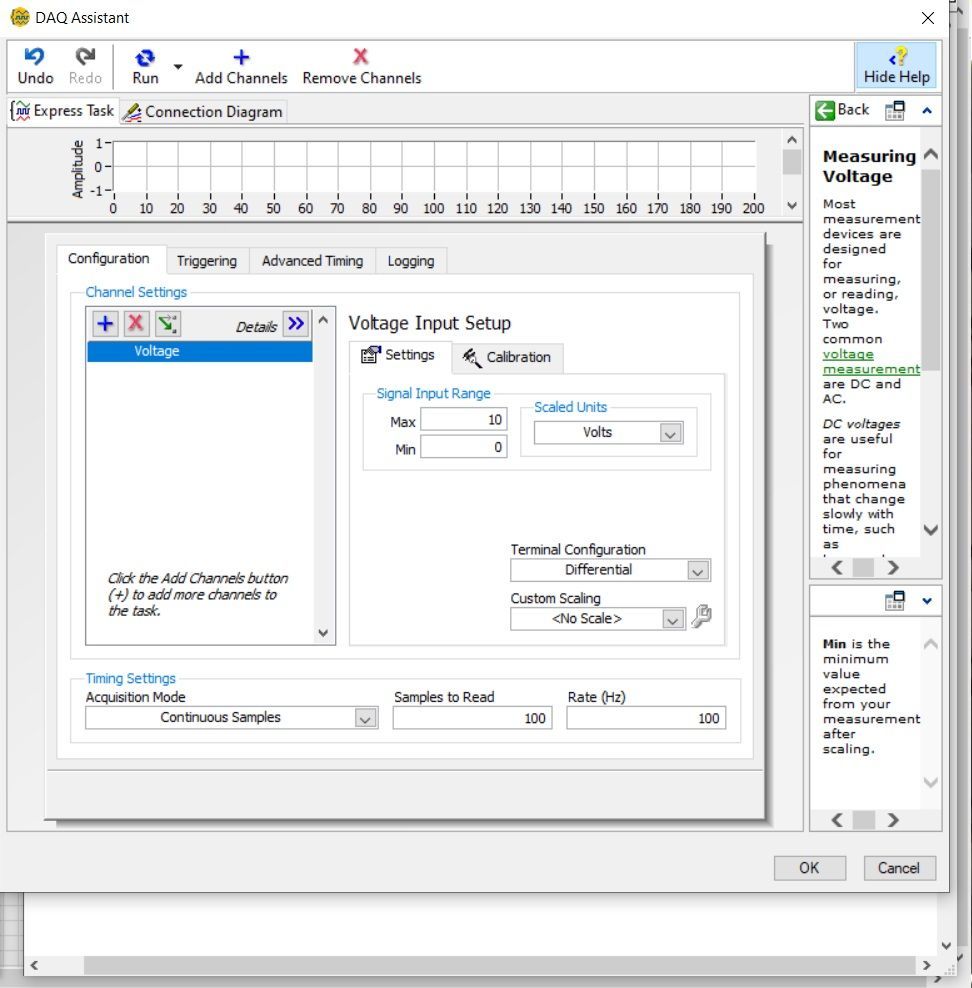
My DAQ assistant acquiere a value of a sensor at a very high speend (100 Hz).
I want to keep that speed because it's displayed in a graph and I want the graph to have a good live resolution. (But yeah I know you can just slow it down in the DAQ assistant parameters)
But, the signal is also linked to valves and they open/close too frequently.
So my goal is : I have a value that comes at a very high rate (100 numbers by second) and I want to return maybe 1 number every second.
Is there a way to do that ? Like a loop structure that returns the value every second ?
I hope this is clear, thanks if someone can help

 RavensFan

07-11-2020 01:32 PM - edited 07-11-2020 01:46 PM
- Mark as New
- Bookmark
- Subscribe
- Mute
- Subscribe to RSS Feed
- Permalink
- Report to a Moderator
Without code attached, we can't see if you are getting 100 individual values per one per 1/100th second, an array of 100 values once per second, or perhaps groups of 10 values every 1/10 of a second.
So depending on the actual acquisition, the implementation may vary. But the basic idea would be to average the numbers together to get a single number.
07-13-2020 10:23 AM
- Mark as New
- Bookmark
- Subscribe
- Mute
- Subscribe to RSS Feed
- Permalink
- Report to a Moderator
Thanks for your answer,
I can join a .vi if you want but it wont work in your Labview because you don't have the hardware.
But I jointed it. This is just the DAQ assistant. I also did a screenshot.
And how in Labview do you return a mean of every 50 values ?
Sounds complicated, you build an array, then every x values the mean of the array is returned etc ? I have no idea how to do it sorry, any other topic, tutorial, examples .vi ?

 scofield
07-13-2020
10:49 AM
- last edited on
08-19-2025
05:38 PM
by
 Content Cleaner
- Mark as New
- Bookmark
- Subscribe
- Mute
- Subscribe to RSS Feed
- Permalink
- Report to a Moderator
Tutorial for LabVIEW: http://www.ni.com/pdf/manuals/373427j.pdf
Tutorial for Data Acquisition: https://www.ni.com/docs/en-US/bundle/320997e/resource/320997e.pdf
These both are basic tutorials. Just search online if you want to learn any specific topic in detail.
For calculating average, you can use math functions (sum of array and divide) along with array function (array size). Or you can directly use mean.vi function.
07-13-2020 12:24 PM
- Mark as New
- Bookmark
- Subscribe
- Mute
- Subscribe to RSS Feed
- Permalink
- Report to a Moderator
This is not just a simple mean, this is means of a continous data acquisition.
Is there a function in Labview that does that ? returning the mean of the X last numbers continuously ?
thanks

 mcduff
07-13-2020 12:48 PM
- Mark as New
- Bookmark
- Subscribe
- Mute
- Subscribe to RSS Feed
- Permalink
- Report to a Moderator
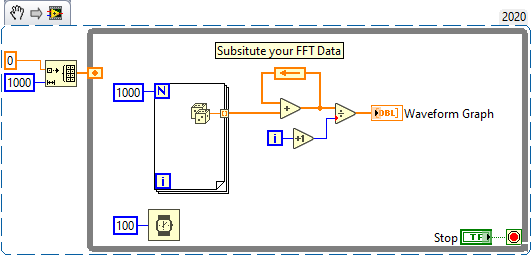
Posted this for something else, but the process is the same. This will continuously average data. You can reset it using a Q&R function.
mcduff
RavensFan
07-14-2020 09:51 AM - edited 07-14-2020 09:52 AM
- Mark as New
- Bookmark
- Subscribe
- Mute
- Subscribe to RSS Feed
- Permalink
- Report to a Moderator
@Oxbow88 wrote:
Thanks for your answer,
I can join a .vi if you want but it wont work in your Labview because you don't have the hardware.
But I jointed it. This is just the DAQ assistant. I also did a screenshot.
And how in Labview do you return a mean of every 50 values ?
Sounds complicated, you build an array, then every x values the mean of the array is returned etc ? I have no idea how to do it sorry, any other topic, tutorial, examples .vi ?
You don't' "join" or "jointed" a VI to a message. You can "attach" it or "have attached" it.
You can turn the blue dynamic datatype wire into an array, then use mean to get the average. Since you are grabbing 100 samples at a time, this will average 100. If you want to average 50, then the easiest thing would be to modify the DAQ Assistant to return 50.
You can see it is a very simple addition to your current VI.


