Turn on suggestions
Auto-suggest helps you quickly narrow down your search results by suggesting possible matches as you type.
Showing results for
Topic Options
- Subscribe to RSS Feed
- Mark Topic as New
- Mark Topic as Read
- Float this Topic for Current User
- Bookmark
- Subscribe
- Mute
- Printer Friendly Page
How to set Time_pref to Absolute in *lvm files (Write to measurement File)

 Litus
Litus
Member
02-15-2008 10:56 AM
Options
- Mark as New
- Bookmark
- Subscribe
- Mute
- Subscribe to RSS Feed
- Permalink
- Report to a Moderator
Hello,
I'm using Labview to get Agilent 4156C data traces and writing this data to a measurement file. I need save data with absolute time, but i don't know how can i do to change "Time_pref Relative" to "Time_prev Asolute" in *.lvm files. What can i do in order to obtain the absolute time colum?
Headers' files are:
LabVIEW Measurement
Writer_Version 0.92
Reader_Version 1
Separator Tab
Multi_Headings Yes
X_Columns Multi
Time_Pref Relative
Operator dclopez
Date 2008/02/15
Time 17:40:01,764999
***End_of_Header***
Channels 1
Samples 100
Date 2008/02/15
Time 17:40:01,764999
X_Dimension Time
X0 0.0000000000000000E+0
Delta_X 1.000000
Writer_Version 0.92
Reader_Version 1
Separator Tab
Multi_Headings Yes
X_Columns Multi
Time_Pref Relative
Operator dclopez
Date 2008/02/15
Time 17:40:01,764999
***End_of_Header***
Channels 1
Samples 100
Date 2008/02/15
Time 17:40:01,764999
X_Dimension Time
X0 0.0000000000000000E+0
Delta_X 1.000000
I need that Delta_X was equals to interval time of sampling.
Thx

 RavensFan

Knight of NI
02-15-2008 10:12 PM - edited 02-15-2008 10:13 PM
Options
- Mark as New
- Bookmark
- Subscribe
- Mute
- Subscribe to RSS Feed
- Permalink
- Report to a Moderator
Where are the signals coming from? What type of signals are they, waveform, dynamic signal type (blue wire), or arrays?
If they are waveform or dynamic type, use the waveform properties to set the t0 and dt with the Build Waveform VI on the waveform pallete. If they are Dynamic Data, you may need to use the from Dynamic Data Type on the Express/Sig Manip. palette to convert it to waveform first.
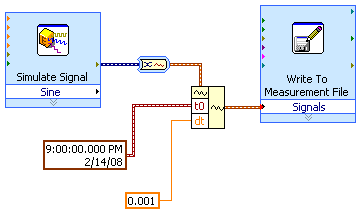
Message Edited by Ravens Fan on 02-15-2008 11:13 PM

02-16-2008 09:23 AM
Options
- Mark as New
- Bookmark
- Subscribe
- Mute
- Subscribe to RSS Feed
- Permalink
- Report to a Moderator
Thanks a lot. Signal trace is an array, that i converted to DDT.
Now, i convert to a waveform with a build waveform tool and i can introduce signal sampling interval (dt) and finally i obtain a meas file with real colum time. Your example has open my eyes.
Thanks again...i'm just LabVIEW beginer.
Now, i convert to a waveform with a build waveform tool and i can introduce signal sampling interval (dt) and finally i obtain a meas file with real colum time. Your example has open my eyes.
Thanks again...i'm just LabVIEW beginer.
RavensFan
Knight of NI
02-16-2008 01:48 PM - edited 02-16-2008 01:49 PM
Options
- Mark as New
- Bookmark
- Subscribe
- Mute
- Subscribe to RSS Feed
- Permalink
- Report to a Moderator
Litus wrote:
Thanks a lot. Signal trace is an array, that i converted to DDT.
Now, i convert to a waveform with a build waveform tool and i can introduce signal sampling interval (dt) and finally i obtain a meas file with real colum time. Your example has open my eyes.
Thanks again...i'm just LabVIEW beginer.
I'm glad it helped. Since the original signal is an array, you don't need to convert to a DDT at all. Expand the build waveform down and you can make the 3rd input. Y. It will allow you to bundle in the data array with the dt and t0.

Message Edited by Ravens Fan on 02-16-2008 02:49 PM

02-16-2008 04:53 PM
Options
- Mark as New
- Bookmark
- Subscribe
- Mute
- Subscribe to RSS Feed
- Permalink
- Report to a Moderator
I convert array to DDT and after then I convert it to waveform...and I put it in waveform input. In the other hand I put interval sampling in dt input.
In your last example...is waveform input empty? Is Y input channel 1? Is my way incorrect? What's the different?
Thx very much.
In your last example...is waveform input empty? Is Y input channel 1? Is my way incorrect? What's the different?
Thx very much.
 RavensFan
Knight of NI
02-16-2008 07:28 PM
Options
- Mark as New
- Bookmark
- Subscribe
- Mute
- Subscribe to RSS Feed
- Permalink
- Report to a Moderator
In my last reply, there is no waveform going into the bundle waveform. I just built the waveform completely from scratch using dt t0 and an array Y.
There is nothing wrong with your way. It just has 2 conversions going to to go from array to DDT, then DDT to waveform. I think the first array to DDT puts in the t0 time as Now if you have it set up that way in the dialog box. Once you have the waveform, you are essentially just modifying it and replacing the dT.
Your way is fine if it works for you, I just wanted to show a different way of doing it.
02-18-2008 09:34 AM
Options
- Mark as New
- Bookmark
- Subscribe
- Mute
- Subscribe to RSS Feed
- Permalink
- Report to a Moderator
Now I have proved the program in 4156C instrument and works fine. The time colum has interval values that I wanted.
Ravens thx you very much.
