Turn on suggestions
Auto-suggest helps you quickly narrow down your search results by suggesting possible matches as you type.
Showing results for
Topic Options
- Subscribe to RSS Feed
- Mark Topic as New
- Mark Topic as Read
- Float this Topic for Current User
- Bookmark
- Subscribe
- Mute
- Printer Friendly Page
How to get Non-Colorable Boolean Decal Option
Solved!
 Bobtheman155
Member
08-05-2022 04:21 PM
Options
- Mark as New
- Bookmark
- Subscribe
- Mute
- Subscribe to RSS Feed
- Permalink
- Report to a Moderator
Labels:
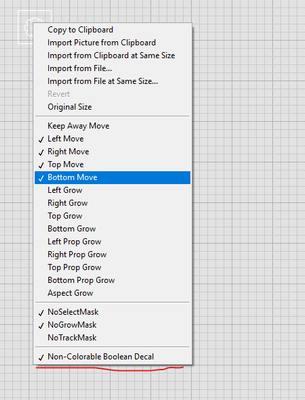
How do i get the Non-Colorable Boolean decal option when creating custom controls? I cannot get this option to appear for the life of me. Any help would be greatly appreciated. I've attached a VI with my latest attempt at enabling this dropdown selection.
Solved! Go to Solution.
Download All

Virus scan in progress. Please wait to download attachments.
Solution
Accepted by topic author Bobtheman155
08-05-2022 04:53 PM
Options
- Mark as New
- Bookmark
- Subscribe
- Mute
- Subscribe to RSS Feed
- Permalink
- Report to a Moderator
I just figured it out. You need to right click then import picture from clipboard select decal. Then put the Control into edit mode and right click on the button. The "Non-Colorable Boolean Decal" Option will be there.
Download All

Virus scan in progress. Please wait to download attachments.
