- Subscribe to RSS Feed
- Mark Topic as New
- Mark Topic as Read
- Float this Topic for Current User
- Bookmark
- Subscribe
- Mute
- Printer Friendly Page
How to detect a serial printer programmatically?

 AJ_CS
AJ_CS
01-02-2013 06:22 AM
- Mark as New
- Bookmark
- Subscribe
- Mute
- Subscribe to RSS Feed
- Permalink
- Report to a Moderator
I have a serial printer connected to COM Port.
Is it possible to check if it is connected, programmatically?
I tried 'VISA find resources' function, but it always lists the COM port whether the printer is connected or not.

 GerdW
GerdW

01-02-2013 08:47 AM
- Mark as New
- Bookmark
- Subscribe
- Mute
- Subscribe to RSS Feed
- Permalink
- Report to a Moderator
Hi AJ,
can you send a command to your printer and check for the devices answer? That would be a presence test...
GerdW
using LV2016/2019/2021 on Win10/11+cRIO, TestStand2016/2019

 paul_a_cardinal
01-02-2013 09:19 AM
- Mark as New
- Bookmark
- Subscribe
- Mute
- Subscribe to RSS Feed
- Permalink
- Report to a Moderator
Functions -> Report Generation -> Advanced Report Generation -> Query Available Printers

 Dennis_Knutson
01-02-2013 09:42 AM
- Mark as New
- Bookmark
- Subscribe
- Mute
- Subscribe to RSS Feed
- Permalink
- Report to a Moderator
I'm not sure the report generation function will work in all cases. It reads the printers that are configured and the default printer. I just ran it and it returned a list including a network printer to a disconnected network.
 mikeporter
01-02-2013 10:06 AM
- Mark as New
- Bookmark
- Subscribe
- Mute
- Subscribe to RSS Feed
- Permalink
- Report to a Moderator
What kind of printer is it?
Mike,,,
Certified Professional Instructor
Certified LabVIEW Architect
LabVIEW Champion
"... after all, He's not a tame lion..."
For help with grief and grieving.
01-03-2013 01:30 AM
- Mark as New
- Bookmark
- Subscribe
- Mute
- Subscribe to RSS Feed
- Permalink
- Report to a Moderator
The printer is 'Star DP8340' serial printer. It is connected to the COM1 port through DB9 connector.
I tried to communicate to the device using VISA. But it returned following error.
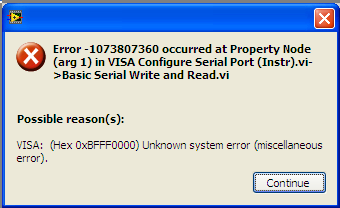
BUt I am able to print from MS office as well as Labview report generation.
The VISA configuration details such as port name and baud rate are correct, I collected it from the windows printer port configuration. But for some reason, the Labview VISA is unable to communicate.
mikeporter
01-03-2013 01:41 AM
- Mark as New
- Bookmark
- Subscribe
- Mute
- Subscribe to RSS Feed
- Permalink
- Report to a Moderator
You get the error because you are trying to talk to a serial device on COM1 but the OS is saying you can't do that because there's a printer there. In essence, the com port is tied up or busy because the OS is using to communicate with a printer.
Mike...
Certified Professional Instructor
Certified LabVIEW Architect
LabVIEW Champion
"... after all, He's not a tame lion..."
For help with grief and grieving.
01-03-2013 02:33 AM
- Mark as New
- Bookmark
- Subscribe
- Mute
- Subscribe to RSS Feed
- Permalink
- Report to a Moderator
Ok, does that mean it is not possible to detect the printer programmatically?

 rolfk
rolfk
01-03-2013 05:25 AM - edited 01-03-2013 05:26 AM
- Mark as New
- Bookmark
- Subscribe
- Mute
- Subscribe to RSS Feed
- Permalink
- Report to a Moderator
Most likely not easily!
LabVIEW can not access the printer since its port is likely already reserved/opened by the printer driver. VISA actually has a specific error code for ports that are normally opened by another process but the error message is a little unspecific. But most likely the printer driver has reserved the port in some non-standard way and VISA then gets some unexpected error because of that.
And the Windows API doesn't have a simple way to query the state of a printer other than if it is installed or not. An involved way may work, using EnumPrinters() requesting for PRINTER_INFO_2 data and checking the Status element in every returned printer record for the PRINTER_STATUS_OFFLINE flag, but that API doesn't count as easy to interface with the Call Library Node.


 sebster
01-03-2013 10:15 AM
- Mark as New
- Bookmark
- Subscribe
- Mute
- Subscribe to RSS Feed
- Permalink
- Report to a Moderator
I looked at the manual for your printer and on page 17 (actually page 21 of the document) is the following information on Control Codes:
CODE ENQ (05)H
FUNCTION Enquiry
OUTLINE
When this code is received, the printer outputs status data.
If it is input after text data input in the STX-ETX mode, the
printer outputs status data and the check byte.
I don't have access to this printer (or any other similar models) to try this out but could this be of any use to you?
