- Subscribe to RSS Feed
- Mark Topic as New
- Mark Topic as Read
- Float this Topic for Current User
- Bookmark
- Subscribe
- Mute
- Printer Friendly Page
How do I enable DAQ Assistant in LabView Student Edition?

 mikegarizona
12-20-2005 11:36 AM
- Mark as New
- Bookmark
- Subscribe
- Mute
- Subscribe to RSS Feed
- Permalink
- Report to a Moderator
Unfotunately I have no DAQ Assistant option. I found some documentation suggesting that I needed the NI Device driver CD available from the FTP site. However this only contained outdated versions of the DAQmx (I had version 😎 and VISA programs, which I have already installed. To be sure, I installed it anyway, but with no change.

 EdDickens

12-20-2005
12:02 PM
- last edited on
06-05-2025
08:12 AM
by
 Content Cleaner
- Mark as New
- Bookmark
- Subscribe
- Mute
- Subscribe to RSS Feed
- Permalink
- Report to a Moderator
DAQmx 8 is what you need for the DAQ Assistant and all DAQ related functions and it is available for download here.
Before you get to deep into the DAQ Assistant, try looking through the Exmaple VIs (Help menu>Find Examples) to see how to do data acquisition without the DAQ Assistant. The DAQ Assistant is OK for something quick you're not going to save and reuse, but if you're building an application, you should learn how to use teh DAQmx VIs correctly.
Ed

Ed Dickens - Certified LabVIEW Architect
Lockheed Martin Space
 Using the Abort button to stop your VI is like using a tree to stop your car. It works, but there may be consequences.
12-20-2005
12:50 PM
- last edited on
06-05-2025
08:13 AM
by
Content Cleaner
- Mark as New
- Bookmark
- Subscribe
- Mute
- Subscribe to RSS Feed
- Permalink
- Report to a Moderator
@Ed Dickens wrote:
DAQmx 8 is what you need for the DAQ Assistant and all DAQ related functions and it is available for download here.
Before you get to deep into the DAQ Assistant, try looking through the Exmaple VIs (Help menu>Find Examples) to see how to do data acquisition without the DAQ Assistant. The DAQ Assistant is OK for something quick you're not going to save and reuse, but if you're building an application, you should learn how to use teh DAQmx VIs correctly.
Ed
Thanks, but as I said above I already have the DAQmx 8 software installed and still do not have the DAQ Assistant available.
I'll look into not using the DAQ Assistant, but the fact that its missing makes me worry that some part of my software is not configured properly. Could someone clarify this point for me?
EdDickens
12-20-2005 01:14 PM - edited 12-20-2005 01:14 PM
- Mark as New
- Bookmark
- Subscribe
- Mute
- Subscribe to RSS Feed
- Permalink
- Report to a Moderator
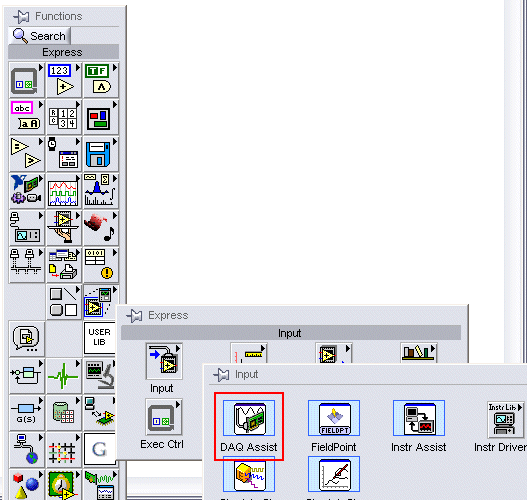
Any version of DAQmx will give you the DAQ Assistant. You should be able to find it two spots as shown in the images below.
If they're not there, something didn't go right during the install. You could try uninstalling and reinstalling.
Let us know how it works out.
Ed

Message Edited by Ed Dickens on 12-20-2005 01:15 PM
Ed Dickens - Certified LabVIEW Architect
Lockheed Martin Space
Using the Abort button to stop your VI is like using a tree to stop your car. It works, but there may be consequences.

12-20-2005 01:40 PM
- Mark as New
- Bookmark
- Subscribe
- Mute
- Subscribe to RSS Feed
- Permalink
- Report to a Moderator
EdDickens
12-20-2005 02:52 PM
- Mark as New
- Bookmark
- Subscribe
- Mute
- Subscribe to RSS Feed
- Permalink
- Report to a Moderator
I'd try uninstalling DAQmx, download a new copy and reinstall.
If that doesn't do it, I'm pretty much at a loss. I've seen some other threads having a similar problem. I'll try and find them and see what happened.
Ed
Ed Dickens - Certified LabVIEW Architect
Lockheed Martin Space
Using the Abort button to stop your VI is like using a tree to stop your car. It works, but there may be consequences.12-20-2005 03:44 PM
- Mark as New
- Bookmark
- Subscribe
- Mute
- Subscribe to RSS Feed
- Permalink
- Report to a Moderator
Thanks so much Ed.
EdDickens
12-21-2005 08:50 AM
- Mark as New
- Bookmark
- Subscribe
- Mute
- Subscribe to RSS Feed
- Permalink
- Report to a Moderator
Thanks for letting us know.
Ed
Ed Dickens - Certified LabVIEW Architect
Lockheed Martin Space
Using the Abort button to stop your VI is like using a tree to stop your car. It works, but there may be consequences.