- Subscribe to RSS Feed
- Mark Topic as New
- Mark Topic as Read
- Float this Topic for Current User
- Bookmark
- Subscribe
- Mute
- Printer Friendly Page
Front Panel strange behaviour

 Giovanno
02-10-2022 07:15 AM
- Mark as New
- Bookmark
- Subscribe
- Mute
- Subscribe to RSS Feed
- Permalink
- Report to a Moderator
Hello, everyone.
I'm having a very strange behaviour in my front panel of my main vi. Its a very large vi, witch handles several classes, subvis, subpanels and a splitter. Yesterday I was tweaking with one indicator that should turn on when there's a communication failure with my DAQ, when a auxiliary subpanel popped up in my main screen, under the main subpanel, and I couldn't select it. I went to the wire diagram, selected it from there and moved it down with keyboard keys. Then, a few minutes after, the whole front panel went full white, with nothing showing up except the windows wrapping frame.
I decided to copy all the code to a new vi, and, to my surprise, the subpanels were not carried over the new vi, but everything welse seemed fine. However, when I placed a subvi and created the reference, the block diagram went crazy, making flat sequences get some kind of infinite height (I couldn't find the top of it). Tried again, same result. I abandoned that idea and returned to my original main and decided to start erasing code to see if something specific was causing this bug, and, to my surprise, it was working, with one drawback. Whenever I would scroll down past some limit, something like less than half of a screen, the scroll would overflow and throw the screen way up the scroll, just like a vertical axis overflow. I tried to remove all the code and see what would happen, and even with an empty front panel, this behaviour would repeat, until the scroll finally set and disabled the vertical scroll.
Could somebody help me? Is there some form of code clean up? Why would pasting the code to a new brand vi cause this strange issue? I started this project in 2016, and it received a lot of upgrades and changes in the code.

 GerdW
GerdW

02-10-2022 07:33 AM
- Mark as New
- Bookmark
- Subscribe
- Mute
- Subscribe to RSS Feed
- Permalink
- Report to a Moderator
Hi Giovanni,
@Giovanno wrote:
Its a very large vi, witch handles several classes, subvis, subpanels and a splitter. Yesterday I was tweaking with one indicator that should turn on when there's a communication failure with my DAQ, when a auxiliary subpanel popped up in my main screen, under the main subpanel, and I couldn't select it. I went to the wire diagram, selected it from there and moved it down with keyboard keys. Then, a few minutes after, the whole front panel went full white, with nothing showing up except the windows wrapping frame.
I started this project in 2016, and it received a lot of upgrades and changes in the code.
This all sounds like the reason might be a too large block diagram…
To get back into a working state you simply pick an older revision of that VI from your SCC repository!
GerdW
using LV2016/2019/2021 on Win10/11+cRIO, TestStand2016/2019
02-10-2022 08:40 AM
- Mark as New
- Bookmark
- Subscribe
- Mute
- Subscribe to RSS Feed
- Permalink
- Report to a Moderator
Hello,
I can't do that. I started noticing this behaviour on my upper splitter, where there's only a logo from my company, so never bothered, and also never needed to scroll down my main screen, too, so I'm afraid that this bug has been lurking for too long.
It seems to me that labview thinks that there's a control far below the lowest real control, so it keeps the scroll bar with a little square, as if the actual front panel vertical range was very large, when it, in fact, isn't, and it happens with both screens.
Edit: I see now that in my main screen the scroll size is coherent, but it keeps overflowing as I stated above.
02-10-2022 09:06 AM
- Mark as New
- Bookmark
- Subscribe
- Mute
- Subscribe to RSS Feed
- Permalink
- Report to a Moderator
More sympthoms:
If I am running the vi (it is running, now), and force stop it with "control" + ".", stop button or end the code as intented, it enters the white screen state and a labview restart is needed, although if I press "ctrl" + "e", it opens the block diagram normally. However, if I try to run it once again, the screen goes to full black.
Also, I have a comment text in the front panel where I write my stuff to do in the code. Whenever I open the vi, it appears resized to a smaller size.
In the copy, if I change anything in the block diagram, it goes haywire, making a mess of it and throwing stuff all over the block diagram
GerdW
02-10-2022 09:11 AM - edited 02-10-2022 09:12 AM
- Mark as New
- Bookmark
- Subscribe
- Mute
- Subscribe to RSS Feed
- Permalink
- Report to a Moderator
Hi Giovanni,
all those symptoms scream: "VI frontpanel/blockdiagram is too large!"
Again: pick an older (but still working) revision of the VI…
(Btw. all the time you are talking about a VI with problems, but you don't attach any code. How should we help then?)
GerdW
using LV2016/2019/2021 on Win10/11+cRIO, TestStand2016/2019
02-10-2022 09:40 AM
- Mark as New
- Bookmark
- Subscribe
- Mute
- Subscribe to RSS Feed
- Permalink
- Report to a Moderator
There it is. I can't send the whole project, though. This vi has some huge clusters that are hidden in the FP.

 Frozen
02-10-2022 11:34 AM
- Mark as New
- Bookmark
- Subscribe
- Mute
- Subscribe to RSS Feed
- Permalink
- Report to a Moderator
Well, I can confirm the FP "scroll bar overflow". Can't say I have ever seen that before. Of course, I have never created such a monstrosity of a VI before either.
Interestingly, I deleted every *visible* control from the FP by selecting it and deleting it. The second sub-panel had to be selected from the BD since it there were two sub-panels named the same.
After deleting everything, there were still some invisible FP controls. Where are these controls on the FP?? They seem to be behind something.

Dropping an empty property node on the BD, there are still a TON of controls to link too.
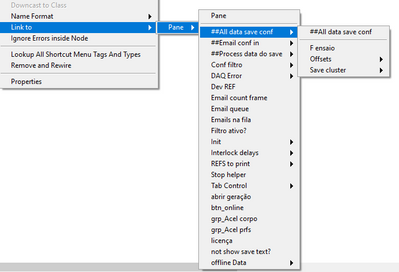
You will have to do some LV scripting to find the control that is hiding everything.
Good luck.
Former Certified LabVIEW Developer (CLD)
02-10-2022 12:03 PM
- Mark as New
- Bookmark
- Subscribe
- Mute
- Subscribe to RSS Feed
- Permalink
- Report to a Moderator
Yes, the code is a monster, and it has tons of funcionality. I guess the main ended up growing too much after so much edition after V1.0
If you copy the block diagram to an empty vi, it will be corrupted, too. My guess is that a bunch of controls have its positions corrupted, or something, because even the labels go to space if I touch in anything in the block diagram...
oh, well
I've found a version one week old that's working
time to recode stuff...

 Mark_Yedinak
02-10-2022 12:45 PM
- Mark as New
- Bookmark
- Subscribe
- Mute
- Subscribe to RSS Feed
- Permalink
- Report to a Moderator
This is very poorly designed code relying too much on local variables, property nodes, hidden controls and too large a block diagram. Anything that is not displayed on the front panel should not have a control or indicator. This data should be contained in a class or on a wire with a shift register. At a minimum you should consider using a state machine. There are other well documented design patterns that would help you. Also, it sounds like you aren't using source code control which you really start using.
Mark Yedinak
Certified LabVIEW Architect
LabVIEW Champion
"Does anyone know where the love of God goes when the waves turn the minutes to hours?"
Wreck of the Edmund Fitzgerald - Gordon Lightfoot

 N_743
N_743
02-10-2022 01:32 PM
- Mark as New
- Bookmark
- Subscribe
- Mute
- Subscribe to RSS Feed
- Permalink
- Report to a Moderator
Hi Glovanno,
Since there are so many Local Variables and you mentioned that you copied pasted the code, there is a very good chance that the control for you local variable(s) assigned itself a random position on FP. This would also explain "infinite height"
Try clicking on "Interlock" local variable on your BD for example.

I, firstly, avoid using too many Local Variables, but if I run into something like this, I usually have to reposition almost everything from scratch. So I avoid using local variables.
Hope this helps,
-N
