- Subscribe to RSS Feed
- Mark Topic as New
- Mark Topic as Read
- Float this Topic for Current User
- Bookmark
- Subscribe
- Mute
- Printer Friendly Page
FFT

 Marco000
07-18-2019 03:13 PM
- Mark as New
- Bookmark
- Subscribe
- Mute
- Subscribe to RSS Feed
- Permalink
- Report to a Moderator
Hi everybody,
I'm writing this post because I would like to know if there was a way to save the results obtained by a FFT.
I'm acquiring a signal with a DAQ and performing a FFT to see its frequency components.
I have no problem to save the data coming out from the DAQ a file with the function "write delimited spreadsheet", but when it comes to the FFT it does not work with the same method (obviously).
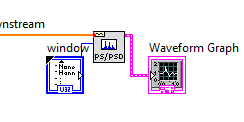
Is there a way to do it ? Thank you so much
Best regards,
Marco

 GerdW
GerdW

07-18-2019 03:18 PM
- Mark as New
- Bookmark
- Subscribe
- Mute
- Subscribe to RSS Feed
- Permalink
- Report to a Moderator
Hi Marco,
the pink wire is a cluster: you can get the elements using the Unbundle function.
Then it becomes easy to save the FFT result...
GerdW
using LV2016/2019/2021 on Win10/11+cRIO, TestStand2016/2019
07-18-2019 04:42 PM
- Mark as New
- Bookmark
- Subscribe
- Mute
- Subscribe to RSS Feed
- Permalink
- Report to a Moderator
Hi,
I used the Unbundle function, then I created an array with the "build array" function and plotted it to see if everything worked.
It does work in Labview, even when I modify the input parameters of the sines components, the FFT is accurate.
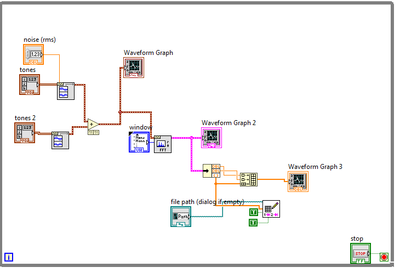
The problem is when I want to upload the data and plot them in Matlab. Basically is like if the file saves only a part of the results but not all of them. If I modify the inputs after the Labview routine has started, it does not show them.
The Matlab code is the following
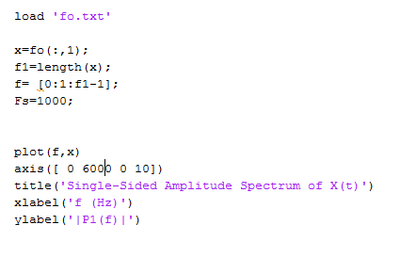
Could you help me out? Thank you so much .
Best,
Marco
GerdW
07-19-2019 12:29 AM - edited 07-19-2019 12:30 AM
- Mark as New
- Bookmark
- Subscribe
- Mute
- Subscribe to RSS Feed
- Permalink
- Report to a Moderator
Hi Marco,
The problem is when I want to upload the data and plot them in Matlab.
I'm not an expert in Matlab - you are asking in a LabVIEW forum…
I used the Unbundle function, then I created an array with the "build array" function
You build an array of those f0, df and Y[] data in LabVIEW: when you load that data in Matlab you should also use the first and second value (f0, df) differently then the Y[] data after them…
Two notes:
- It doesn't make sense to create a plot with prepended f0 and df values!
- Use UnbundleByName as it creates much better selfdocumenting code!
GerdW
using LV2016/2019/2021 on Win10/11+cRIO, TestStand2016/2019
