- Subscribe to RSS Feed
- Mark Topic as New
- Mark Topic as Read
- Float this Topic for Current User
- Bookmark
- Subscribe
- Mute
- Printer Friendly Page
DLL Importer and array pointers

 xl600
xl600
12-16-2016 05:31 PM
- Mark as New
- Bookmark
- Subscribe
- Mute
- Subscribe to RSS Feed
- Permalink
- Report to a Moderator
I have a DLL of a few hundred functions that I need to import. Many of which use array pointers.
Normally, this would be handled by re-configuring the library call in the resulting VI.
I couldn't find anywhere in the DLL importer tool to specify array pointer inputs and outputs. So, am I stuck havinng to go into every generated VI and update/reconfigure?
I would be exceptionally cool if this configuration could be automated in some fashion (Scripted or special header definitions that would tell the LabView importer how to handle pointers). I hate the thought of hand tweaking autogenerated VIs! Especially hundreds of them.
Thanks,
XL600

 Euge_Or_Pat
12-19-2016 10:00 AM
- Mark as New
- Bookmark
- Subscribe
- Mute
- Subscribe to RSS Feed
- Permalink
- Report to a Moderator
Hi XL600,
Unfortunately the Wizard doesn't have the ability to see the difference between a pointer to a number and a pointer to an array since they are technically both the same thing. This is outlined here but it looks like you already knew this.
Fortunately there is a way to modify your call library function nodes dynamically! VI scripting is a wonderful thing. You can dynamically modify (and create) a library function node dynamically by parsing a header file and using VI server tools. Here is a quick snippet I whipped up so that you can see how to modify the inputs and outputs of a prexisting library function node.
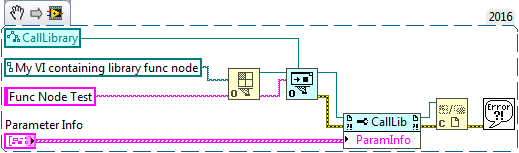
Hopefully that's enough to get you started!
Regards,
Pat B
Certified LabVIEW Developer | Applications Engineer | National Instruments
ni.com/support
12-19-2016 10:08 AM
- Mark as New
- Bookmark
- Subscribe
- Mute
- Subscribe to RSS Feed
- Permalink
- Report to a Moderator
Didn't know that could be done. I'll give it a try. Thanks!
XL600
