- Subscribe to RSS Feed
- Mark Topic as New
- Mark Topic as Read
- Float this Topic for Current User
- Bookmark
- Subscribe
- Mute
- Printer Friendly Page
Build an array and plot XY Graph for logged data in real time

 parthpanchal07
04-20-2018 09:46 AM
- Mark as New
- Bookmark
- Subscribe
- Mute
- Subscribe to RSS Feed
- Permalink
- Report to a Moderator
Hello All,
Actually, I am new to the Labview and I am stuck at one problem.
Here, I have attached my VI's. I want to logged the centroid value in array and want to plot the XY graph.
Apart from it if any body can suggest me how can I increase my image processing.
Any help would be appreciate.
Thanks

 ML927
ML927
04-20-2018 10:32 AM
- Mark as New
- Bookmark
- Subscribe
- Mute
- Subscribe to RSS Feed
- Permalink
- Report to a Moderator
Hello,
I am not quite sure were you have a problem, can you be more specific about waht you are stuck with ?
Otherwise, useful info on how to use the XY Graph : https://knowledge.ni.com/KnowledgeArticleDetails?id=kA00Z0000019NAfSAM
04-20-2018 10:35 AM
- Mark as New
- Bookmark
- Subscribe
- Mute
- Subscribe to RSS Feed
- Permalink
- Report to a Moderator
In my VI you can see I am getting centroid value from subVI.
1. I want to make to build an array of centroid values.
2. then I want to plot the XY graph continuoisly.
Here, I am stuck.

 RTSLVU
04-20-2018 10:50 AM - edited 04-20-2018 11:04 AM
- Mark as New
- Bookmark
- Subscribe
- Mute
- Subscribe to RSS Feed
- Permalink
- Report to a Moderator
When using an X-Y graph you have to keep your own graph history in shift registers.
Here is an example I did for someone with a similar question
XY Graph2 will plot "live data" XY Graph1 will mirror XY Graph2 after the for loop completes
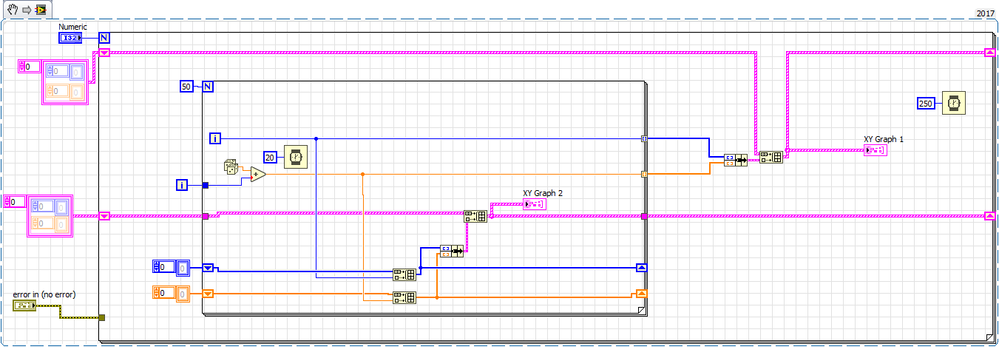
I know it's not a perfect example but I modified someone else's code to make it work...
Here is another example of an XY graph that plots live data, it is also an "action engine" sub-VI, and you can see shift registers are used to hold the graph history

=== Engineer Ambiguously ===
========================
