- Subscribe to RSS Feed
- Mark Topic as New
- Mark Topic as Read
- Float this Topic for Current User
- Bookmark
- Subscribe
- Mute
- Printer Friendly Page
Build Specification description
Solved!
 labvieur
07-22-2020 10:22 AM
- Mark as New
- Bookmark
- Subscribe
- Mute
- Subscribe to RSS Feed
- Permalink
- Report to a Moderator
How can I get/set the 'Build specification Description'?
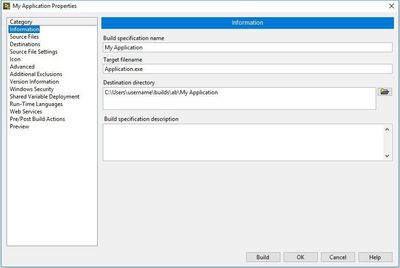
Optionally, The Description text in 'Version Information'. The idea is to use one of these fields to generate a 'version log' file everytime a new version is built.
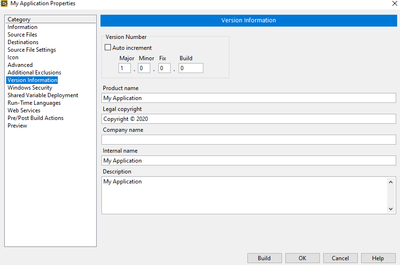
is it possible to programmatically get/set any of these? Till now all I could get was the Version Information numbers. (major/minor/fix/bluid) but not the rest of the fields.
Solved! Go to Solution.

 Bob_Schor

07-22-2020 10:40 AM
- Mark as New
- Bookmark
- Subscribe
- Mute
- Subscribe to RSS Feed
- Permalink
- Report to a Moderator
If you are using Version Control Software, then your Version Log should reside inside the VCS logs. Several of us (including me) use the VCS Revision number as the "Build" component of the Version Information numbers, particularly since you can usually programmatically obtain this number from your VCS system and can programmatically set it before you do the actual Build. Note, however, that if you "do the logical step" of doing this as part of a "Pre-Build Action" that NI so nicely supplies, you will find that the Build spec of the freshly-built Executable hasn't changed (since NI "caches" this number before reading what you asked it to do "pre-Build", which I foolishly interpreted as "before the Build"). I've had a suggestion on the NI Idea Exchange to fix this, got a lot of push-back from NI, and came up with several work-arounds that I now use.
Bob Schor

 FireFist-Redhaw
07-22-2020 12:03 PM
- Mark as New
- Bookmark
- Subscribe
- Mute
- Subscribe to RSS Feed
- Permalink
- Report to a Moderator
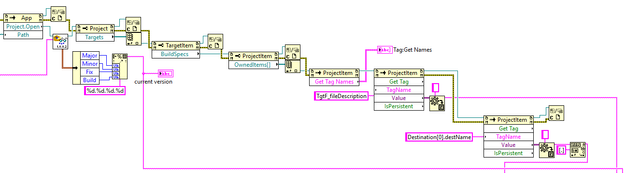
The BuildSpec class has the Get Tag and Set Tag methods. The two tags you will want to work with are Bld_buildSpecDescription for the Build Spec Description and TgtF_fileDescription for the Version Description.
Saying "Thanks that fixed it" or "Thanks that answers my question" and not giving a Kudo or Marked Solution, is like telling your waiter they did a great job and not leaving a tip. Please, tip your waiters.
07-23-2020 03:03 AM
- Mark as New
- Bookmark
- Subscribe
- Mute
- Subscribe to RSS Feed
- Permalink
- Report to a Moderator
Hi Bob & Andrew,
Thank you for your swift responses. I created a Post-Build Action VI which outputs the version information to a file as follows:
 theguywithnoali
01-08-2026 01:25 AM
- Mark as New
- Bookmark
- Subscribe
- Mute
- Subscribe to RSS Feed
- Permalink
- Report to a Moderator
Hey FireFist-Redhaw
Might be useful for me for build integration to know more objects 🙂
Bob_Schor
01-08-2026 02:56 PM
- Mark as New
- Bookmark
- Subscribe
- Mute
- Subscribe to RSS Feed
- Permalink
- Report to a Moderator
Hello, @labvieur.
I've recently tried to create Pre-Build and Post-Build actions for my Build Spec,s (I was successful in doing this on a LabVIEW Project I built a dozen years ago, but it blew up in my face when I tried it on another project last year), so I was intrigued to see what appeared to be a "picture" of a successful Post-Build Action.
Could you please attach your Post Build Action VI (and, if you have one, a Pre-Build Action VI)? [I'm running LabVIEW 2024, so if you are running a more-recent version, I'll need to upgrade ...].
Bob Schor
FireFist-Redhaw01-08-2026 06:42 PM
- Mark as New
- Bookmark
- Subscribe
- Mute
- Subscribe to RSS Feed
- Permalink
- Report to a Moderator
@theguywithnoalias wrote:
Hey FireFist-Redhaw
k, out of curiosity, how did you manage to get the Object Names for those properties like Bld_buildSpecDescription?
Might be useful for me for build integration to know more objects 🙂
You can list them all using a different method:
 Get Build Spec Tag Names.png
Saying "Thanks that fixed it" or "Thanks that answers my question" and not giving a Kudo or Marked Solution, is like telling your waiter they did a great job and not leaving a tip. Please, tip your waiters.

 Kyle97330
01-08-2026 07:11 PM
- Mark as New
- Bookmark
- Subscribe
- Mute
- Subscribe to RSS Feed
- Permalink
- Report to a Moderator
@FireFist-Redhawk wrote:
@theguywithnoalias wrote:
Hey FireFist-Redhaw
k, out of curiosity, how did you manage to get the Object Names for those properties like Bld_buildSpecDescription?
Might be useful for me for build integration to know more objects 🙂You can list them all using a different method:
Spoiler
You're not wrong that this method lists a lot of tag names you can use but there is an issue that it only returns the "active" tags, i.e. tags that have been set to something other than their default value.
For instance, if I list the tags on a "beta" build I am doing that I have set to version 0.3.2.0, it only shows the tags for the "minor" and "patch" parts of the version number, since the other two are zeroes:

Additionally, some tags (such as the "Destination" tag at the bottom of my screenshot) are in an array so you can't just use the name, you have to know what array index to put in the brackets. There's a tag that's named DestinationCount (or "whateverCount" for other items) that you can check to see how big the array is.
And one more option just to get the list of tags without messing with VI scripting is that if you just open the .lvproj file in a text editor, you can see them all just by going to the "Build specifications" section and seeing what all the Property name="whatever" values are. This is Notepad++:

Still the same limitation that it only shows non-default valued tag names though.
