- Subscribe to RSS Feed
- Mark Topic as New
- Mark Topic as Read
- Float this Topic for Current User
- Bookmark
- Subscribe
- Mute
- Printer Friendly Page
Array Interpolation

 dfaweew
04-26-2014 05:07 AM
- Mark as New
- Bookmark
- Subscribe
- Mute
- Subscribe to RSS Feed
- Permalink
- Report to a Moderator
hello,everyone!I had asked a similar question in here http://forums.ni.com/t5/LabVIEW/Array-Interpolation/m-p/2819440#M825228,But now I want to know how this interpolation:In a [1] to insert a value, in a [3] to insert three values, in a [5] to insert five values , so that in turn the cycle continues until it reaches 100,I do not know how to do , hoping to get help, thank you!

 altenbach

04-26-2014 08:51 PM
- Mark as New
- Bookmark
- Subscribe
- Mute
- Subscribe to RSS Feed
- Permalink
- Report to a Moderator
Just to make things clear, what you are asking has nothing to do with "interpolation" unless the element that you insert contain a proportionally interpolated value based on the neighbors.
@dfaweew wrote:
hello,everyone!I had asked a similar question in here http://forums.ni.com/t5/LabVIEW/Array-Interpolation/m-p/2819440#M825228,But now I want to know how this interpolation:In a [1] to insert a value, in a [3] to insert three values, in a [5] to insert five values , so that in turn the cycle continues until it reaches 100,I do not know how to do , hoping to get help, thank you!
You need to be much more clear in the problem description. what does "in a [1]" or "in a [3]", etc mean? Please show us a small sample array and tell us how it should look like after the various operations.

04-26-2014 09:41 PM
- Mark as New
- Bookmark
- Subscribe
- Mute
- Subscribe to RSS Feed
- Permalink
- Report to a Moderator
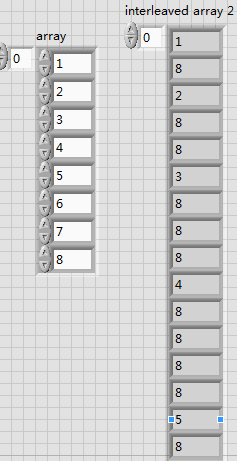
First of all thank you for your reply!I want to achieve is such as the following:left-----right!
 altenbach
04-27-2014 12:46 AM
- Mark as New
- Bookmark
- Subscribe
- Mute
- Subscribe to RSS Feed
- Permalink
- Report to a Moderator
Well, this seems to be another homework.
What have you tried so far and where did you encounter problems?
04-27-2014 02:31 AM
- Mark as New
- Bookmark
- Subscribe
- Mute
- Subscribe to RSS Feed
- Permalink
- Report to a Moderator
sorry!I made a mistake,The following picture shows the relationship is in need of conversion;
 altenbach
04-27-2014 02:53 AM - edited 04-27-2014 11:11 AM
- Mark as New
- Bookmark
- Subscribe
- Mute
- Subscribe to RSS Feed
- Permalink
- Report to a Moderator
Again: What have you tried and where did you encounter difficulties. Show us some thought process and solution attempts and we will guide you in the right direction. This is a help forum, not a homework service.

 GerdW
GerdW
04-27-2014 03:54 AM - edited 04-27-2014 03:55 AM
- Mark as New
- Bookmark
- Subscribe
- Mute
- Subscribe to RSS Feed
- Permalink
- Report to a Moderator
Hi dfaweew,
it seems you need to do this:
- in the 1st iteration you take one element and append one zero.
- in the 2nd iteration you take the next two elements and append two zeros…
- in the 3rd iteration you take the next three elements and append three zeros…
Did you get the scheme?
As Christian said: start to code , attach your VI and tell us, where you run into problems with it!
GerdW
using LV2016/2019/2021 on Win10/11+cRIO, TestStand2016/2019
04-29-2014 10:29 AM
- Mark as New
- Bookmark
- Subscribe
- Mute
- Subscribe to RSS Feed
- Permalink
- Report to a Moderator
hello!
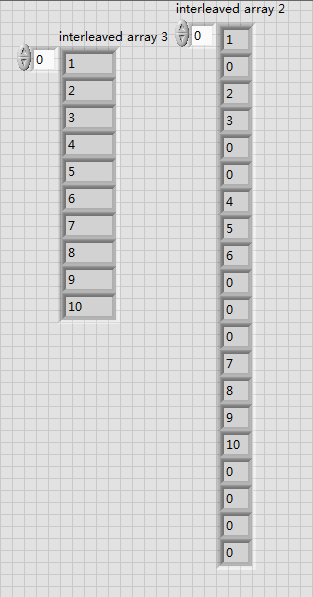
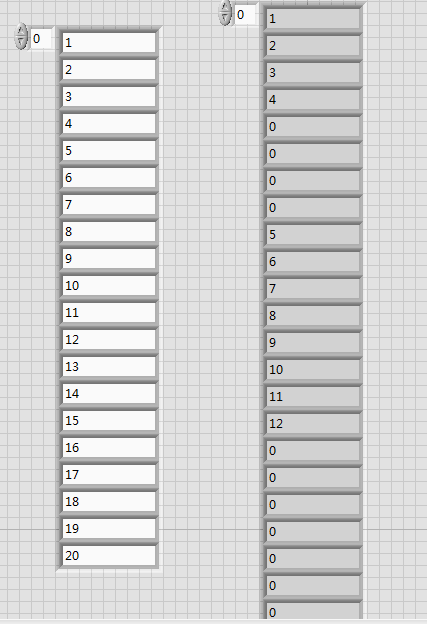
- in the 1st iteration you take four element and append four zero.
- in the 2nd iteration you take the next eight elements and append eight zeros…
- in the 3rd iteration you take the next sixteen elements and appendsixteen zeros….....Cycle....like show at Figure 3
I tried to achieve this by the way in Figure 2.
But think of the shift register can not seem to realize the functions I want to achieve;and I also want to use Decimate 1D Array Function and Interleave 1D Arrays Function to achieve ,But still can not seem to find it;I now have no way;Please give me some valuable suggestions or tell me how to do,Best regards,

 altenbach
04-29-2014 12:05 PM
- Mark as New
- Bookmark
- Subscribe
- Mute
- Subscribe to RSS Feed
- Permalink
- Report to a Moderator
You should be ashamed to post code pictures with hidden an right-to-left wires. Next time attach the VI instead. You are also doing this way too complicated. Try to do it with a single loop and 25% of the current code. For the second problem, you can use the same counter but scale the value with powers of two.
04-29-2014 10:28 PM
- Mark as New
- Bookmark
- Subscribe
- Mute
- Subscribe to RSS Feed
- Permalink
- Report to a Moderator
Thank you for your reply!you say do it with a single loop and 25% of the current code. can you Change my vi or attach your vi!It sounds easier said than done,Best regards,
