ni.com is currently undergoing scheduled maintenance.
Some services may be unavailable at this time. Please contact us for help or try again later.
- Subscribe to RSS Feed
- Mark Topic as New
- Mark Topic as Read
- Float this Topic for Current User
- Bookmark
- Subscribe
- Mute
- Printer Friendly Page
2015 Icon Editor Behavior

 Lukin
Lukin
09-16-2015 10:21 AM - edited 09-16-2015 10:22 AM
- Mark as New
- Bookmark
- Subscribe
- Mute
- Subscribe to RSS Feed
- Permalink
- Report to a Moderator
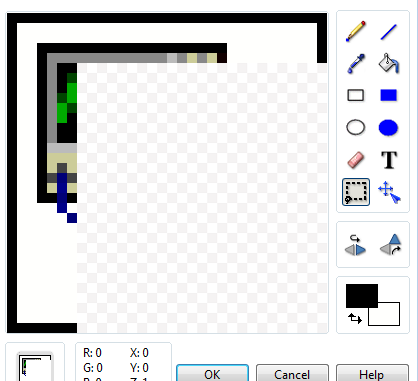
So I am seeing some strange behavior with the Icon Editor in 2015 32bit (have not tired 64) and wondering if others are. I have seen it on two computers so its nothing local to a computer.
When first opening the icon editor my normal work flow is to CTRL-A to select the entire area and hit Delete to clear it. This gives me a clean slate to select one of my templates and make the icon I need. In 2015 this does not seem to work. CTRL-A seems to select everything but when I hit delete the dashed line used to select disapears but the existing icon remains. If I take it a step further and use the Select tool to select the entire area I see the same behavior.

However if using the Select tool and I select some subset of the icon Delete works and the selected area is deleted. By doing this several times I am able to clear the enitre icon. So it apears the issue is only when the entire area of the icon is selected. Anyone else see this behaivor? Seems like a bug to me.
Certified LabVIEW Architect

 Sam_Sharp

09-16-2015 10:30 AM
- Mark as New
- Bookmark
- Subscribe
- Mute
- Subscribe to RSS Feed
- Permalink
- Report to a Moderator
Do you have a particular layer selected when you do the delete? I think selecting a layer will only delete from that layer and if you have no layer selected it will delete from every layer?

 Darren
09-16-2015 10:31 AM
- Mark as New
- Bookmark
- Subscribe
- Mute
- Subscribe to RSS Feed
- Permalink
- Report to a Moderator
It looks like this behavior was introduced in LabVIEW 2014. I have filed CAR 546121 on the issue. As a workaround, you can go to the layers tab and click the icon layer and press the Delete key.

 jamiva
09-16-2015 10:36 AM
- Mark as New
- Bookmark
- Subscribe
- Mute
- Subscribe to RSS Feed
- Permalink
- Report to a Moderator
As anothor work around, if you "Double Click" the selection tool you will be able to use the delete key to erase the entire icon.
09-16-2015 10:39 AM
- Mark as New
- Bookmark
- Subscribe
- Mute
- Subscribe to RSS Feed
- Permalink
- Report to a Moderator
Sam: I don't select a layer. I can reproduce the behavior by opening a new VI, double clicking on the icon to open the editor, and then following the process I outlined above.
Darren: Thanks for the update and the work around does work. That being said I wonder if it is the same problem. When I try the same process on 2014SP1 the delte key works fine after CTRL-A producing a blank slate.
Certified LabVIEW Architect

 Bob_Schor
09-16-2015 10:54 AM
- Mark as New
- Bookmark
- Subscribe
- Mute
- Subscribe to RSS Feed
- Permalink
- Report to a Moderator
Son of a Gun! I never knew that trick existed! I've always just gone to the Layer Page (when opening a new Icon) to delete NI's Default layer. I've demonstrated (to myself) that (in LV2012) if you select a Template for a new VI (with the default NI Icon visible) and do a Ctrl-A/Delete (or double-click-Selection/Delete), the overlying Default Icon vanishes and your "underlying" Template is revealed. A great time-saver.
I also verified the 2015 behavior. However, the "double-click-Selection/Delete" method didn't work for me -- I still need to go to the Layers tab, select the Default Icon layer, and delete it.
Bob Schor
09-16-2015 10:59 AM
- Mark as New
- Bookmark
- Subscribe
- Mute
- Subscribe to RSS Feed
- Permalink
- Report to a Moderator
jamiva: Nice little trick. I did not know you could do that. But it has the same issue. It will select the entire area but when Delete is hit nothing happens.
Bob: Ya its a handy little time saver. Saves a few seconds everytime I make an icon. and every little bit helps.
Thanks for the interest everyone.
Certified LabVIEW Architect

 Hooovahh
09-16-2015 11:15 AM
- Mark as New
- Bookmark
- Subscribe
- Mute
- Subscribe to RSS Feed
- Permalink
- Report to a Moderator
If others haven't yet tried double clicking random things yet, you can also do this on the rectangle tool to make a border using the primary color, and change the font of a text layer.
Unofficial Forum Rules and Guidelines
Get going with G! - LabVIEW Wiki.
17 Part Blog on Automotive CAN bus. - Hooovahh - LabVIEW Overlord

 sassyaspy
03-31-2016
03:18 PM
- last edited on
11-16-2024
03:57 PM
by
 Content Cleaner
- Mark as New
- Bookmark
- Subscribe
- Mute
- Subscribe to RSS Feed
- Permalink
- Report to a Moderator
Hi everyone,
CAR 546121 was fixed in LabVIEW 2015 SP1. You can find a download for it here:
https://www.ni.com/en/support/downloads/software-products/download.labview.html#306326
 RTSLVU
03-31-2016
04:30 PM
- last edited on
03-26-2025
05:16 PM
by
Content Cleaner
- Mark as New
- Bookmark
- Subscribe
- Mute
- Subscribe to RSS Feed
- Permalink
- Report to a Moderator
@sassyaspy wrote:
Hi everyone,
CAR 546121 was fixed in LabVIEW 2015 SP1. You can find a download for it here:
https://www.ni.com/en/support/downloads/software-products/download.labview.html#306326
That explains why I do not see this behavior.
=== Engineer Ambiguously ===
========================
