Overview
This example generates a pie chart with legend using the LabVIEW picture control.
Description
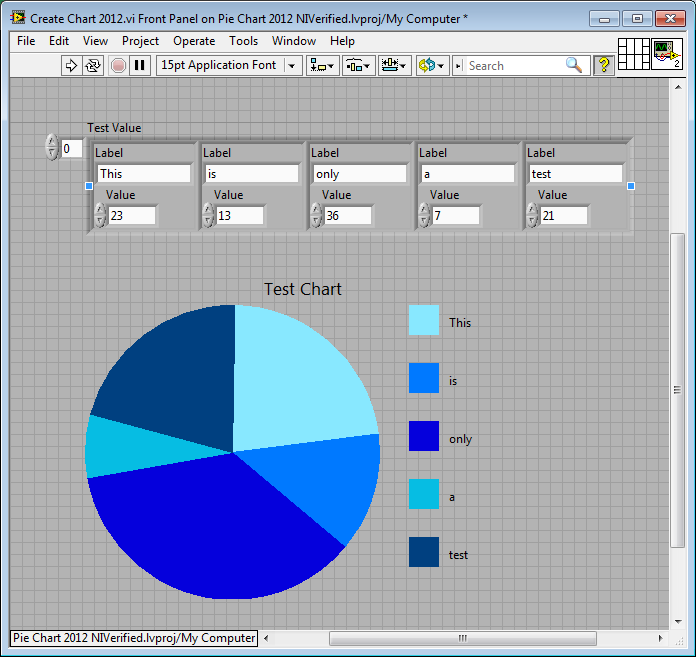
This example generates a pie chart using the LabVIEW picture control. Given an array of clusters containing a label and a value, a pie chart with legend is generated and displayed.
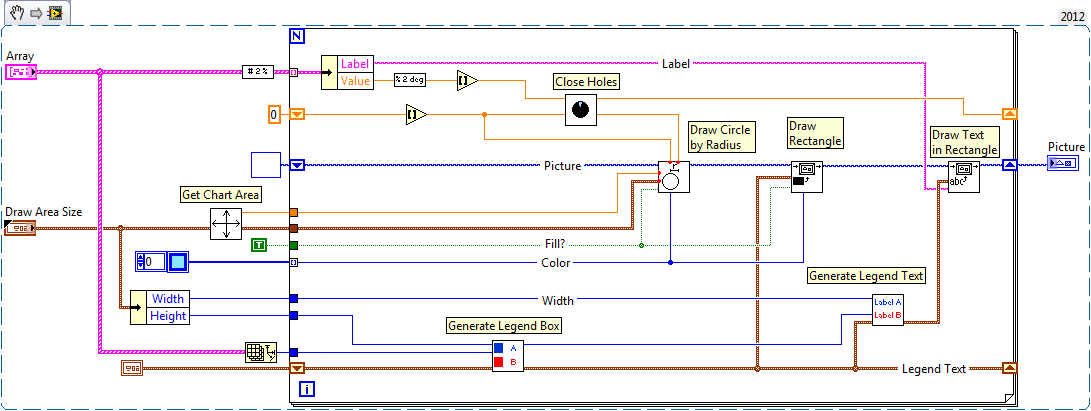
Pie Chart 2012.vi is the VI that actually creates the chart. Create Chart 2012.vi is a test VI used to show what the chart looks like.
Requirements:
- LabVIEW 2012 (or compatible)
Steps to Implement or Execute Code
- Download the attached ZIP file and open the project file.
- Open Create Chart 2012.vi and specify the Labels and Values in Test Value cluster array.
- Run the VI and a pie chart with legend is generated and displayed.
- If you want to view how the pie chart is created, open the Pie Chart 2012.vi to show the details.
Additional Information or References
Front Panel of Create Chart 2012.vi
VI Snippet of Pie Chart 2012.vi
**This document has been updated to meet the current required format for the NI Code Exchange.**


