Using Inverse Kinematics with an interactive simulation of a Hexapod in LabVIEW
- Subscribe to RSS Feed
- Mark as New
- Mark as Read
- Bookmark
- Subscribe
- Printer Friendly Page
- Report to a Moderator
Code and Documents
Attachment
Introduction
One of my previous examples was to generate an interactive 3D model of a hexapod in a 3D picture control in LabVIEW, you can find that here.
This example builds on that one, by implementing Inverse Kinematics to actually control the legs in co-ordinated movement!
The CH6-R Hexapod is a kit designed by Lynxmotion.
A hexapod consists of six legs, and rather than using wheels to move around, it uses it's legs to walk, much like a beetle or any other six-legged insect you can think of.
Controlling a the legs of a hexapod is no trivial task. As it is, the legs on this hexapod are actuated with three motor joints.
When you want to control such a leg, it becomes desirable to be able specify the x,y,z position of foot, relative to the shoulder of the leg.
For example, when you move your arm to pick up an object, you think in terms of cartesian co-ordinates (move my hand forward until I touch the object). However, your arm consists of a number of rotational joints (much like a hexapod leg). Your brain is figuring out the angles required to actually move your hand in the cartesian space, instead of the joint angle space.
To control a hexapod, it's desirable to do the same thing, ideally you want to be able to specify the point of the foot in x,y,z co-ordinates, relative to the shoulder.
The process of taking a cartesian point, and converting it to joint angles to send to the leg, is called Inverse Kinematics. As you can imagine, Inverse Kinematics (IK) consists mainly of trigonometic calculations.
In this example, a function has been written to convert a desired Cartesian Co-ordinate destination, into raw angles to actually control the motors.
This legs can be controlled in either the Cartesian Co-ordinate space, or the Oriented Cartesian space. More information on these can be found in the VI.
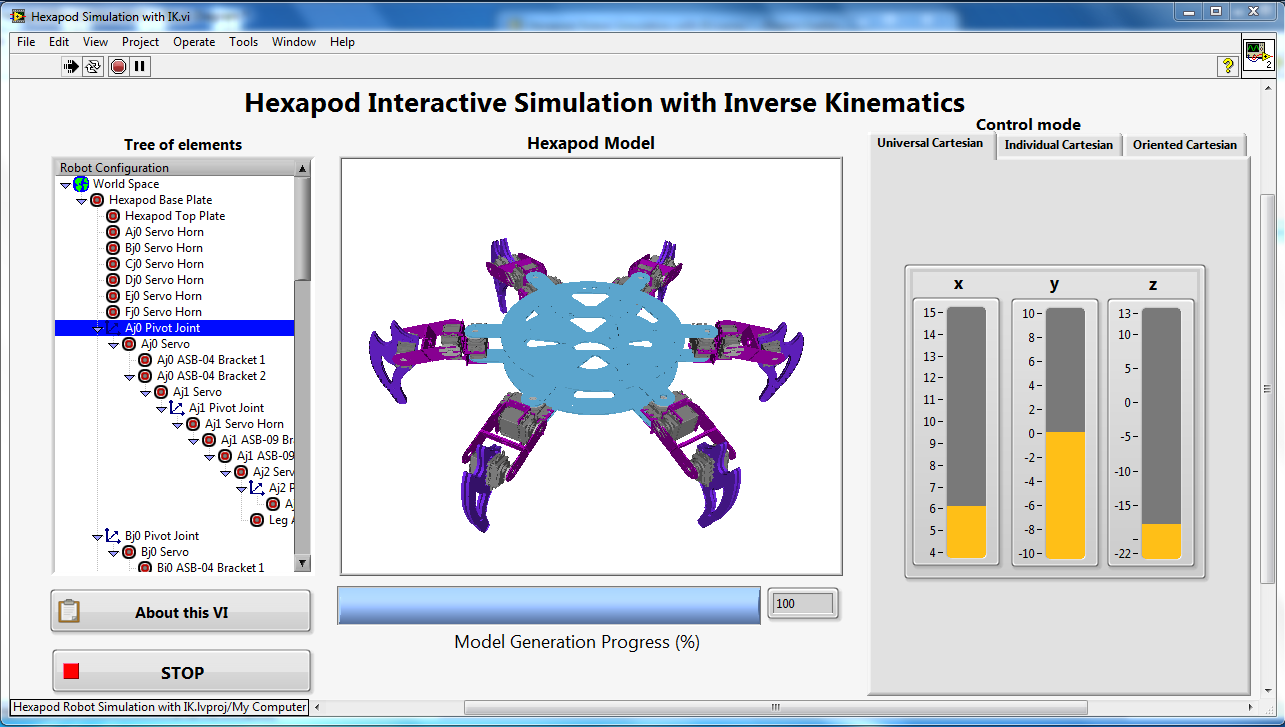
As before, in my previous example, the VI generates a 3D interactive simulation using 3D picture manipulation VIs. I then use my own custom written code to actually implement the trigonometric equations needed to go from cartesian co-ordiates to joint angles.

You can find loads more information on how it works in the info dialogue boxes that pop up.


I hope you enjoy this example!
Applications Engineer
National Instruments UK & Ireland
Example code from the Example Code Exchange in the NI Community is licensed with the MIT license.


- Mark as Read
- Mark as New
- Bookmark
- Permalink
- Report to a Moderator
Can you please send me those ctl files which are missing for this project. I am planning to learn from your project. It will be ery useful for me. saravanaprashanth@outlook.com is my email id.

- Mark as Read
- Mark as New
- Bookmark
- Permalink
- Report to a Moderator
Actually i am facing problem with how to use Inverse kinematics sketch to control Robotic Arm ( Scara Robotic Arm),
I am wondering if you can please help me with small example that consist of converting a desirable x,y,z position into a specific angles for each joints.
This is my Email Dali.charfi@ieee.org
Looking forward for your kindly help.
THanks.

