Description
Description-Separate-1Overview
This example shows how you can use a Multifunction DAQ device to control a stepper motor from the LabVIEW front panel.
Description
The program generates a finite number of pulses based on the position changes of a knob on the front panel. The digital high and low pulses for the steps are controlled using sequence structures. The user selected pulse times are inputted into a Wait function that dictates how long each pulse rests in the false or true value of the digital boolean DAQmx Write task.
Requirements
Software
LabVIEW 2009 or compatible
DAQmx 9.1.5 or compatible - Link
Hardware
Compatible Multifunction DAQ device with Digital I/O
Steps to Implement or Execute Code
- Specify your desired Stepper Output and Direction Control Line from your Digital DAQ device on the Front Panel
- Set the Low and High Time Pulse Characteristics
- Run the VI
- Manipulate the position of the stepper motor using the Position Knob
Additional Information or References

VI Snippet
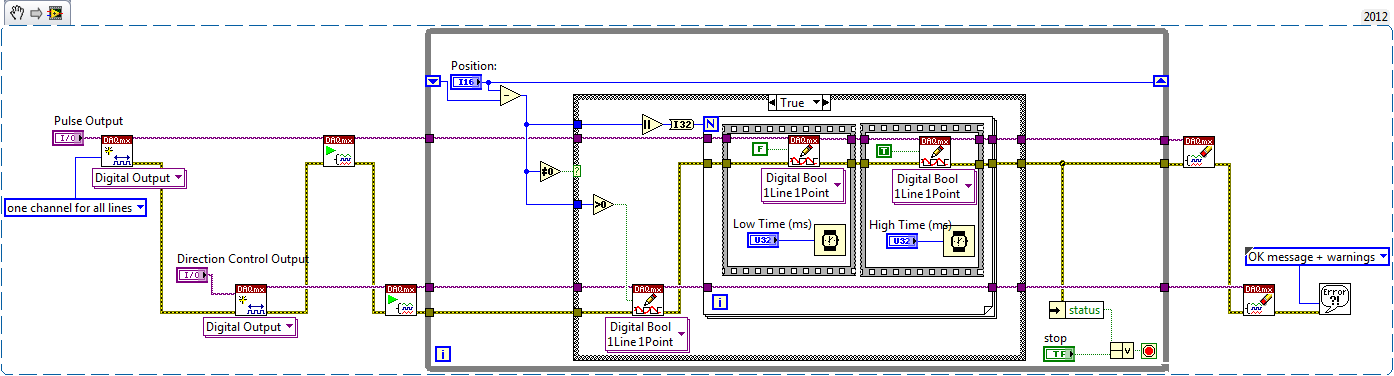
**This document has been updated to meet the current required format for the NI Code Exchange.**
Description-Separate-2


