Overview
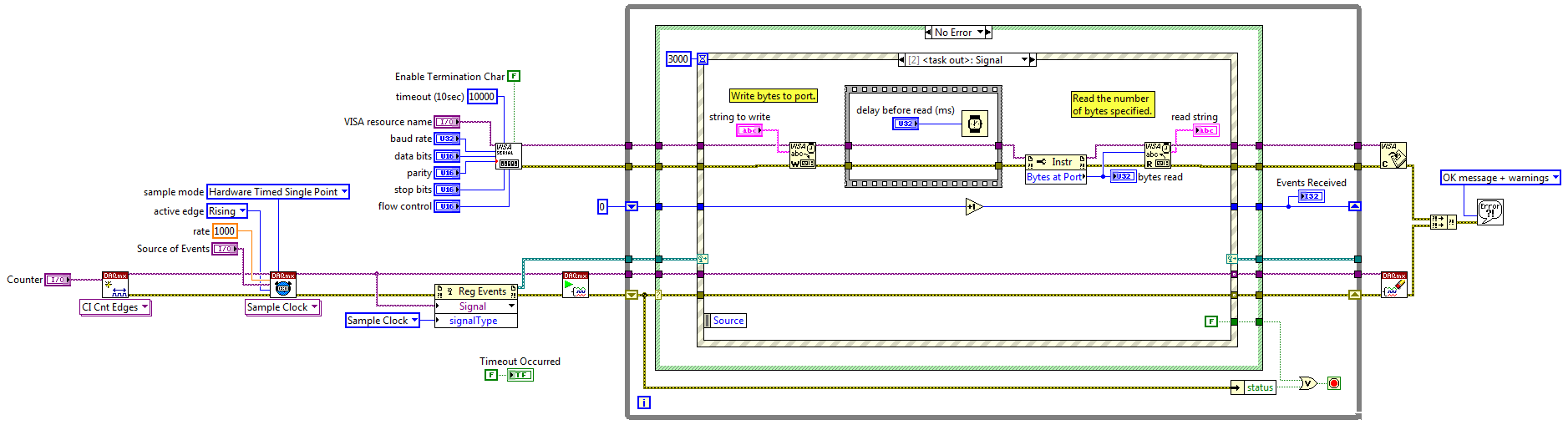
This example uses a counter input to trigger a serial acquisition. When the counter detects a digital event, the specified string command is written to the serial port and a serial read is executed.
Description
Serial commands are typically software-timed, sent every iteration of a loop. By importing a sample clock, the serial commands can be synchronized with external acquisitions based on hardware timing. Each time the external sample clock strikes, an event is registered and each event triggers a serial acquisition.
Requirements
Software
- LabVIEW 8.6 or compatible
- NI-VISA driver compatible with the version of LabVIEW
- NI-DAQmx 8.7.2 or compatible
Hardware
Steps to Implement or Execute Code
- Configure the physical channel, source of events, and VISA resource on the front panel
- Configure the serial parameters on the front panel to match the serial parameters of your device
- Specify the VISA command to be written in the string to write control on the front panel
- Run the VI
- Observe the events received, bytes read, and the read string on the front panel
Additional Information or References
Block Diagram
**This document has been updated to meet the current required format for the NI Code Exchange.**


