Overview
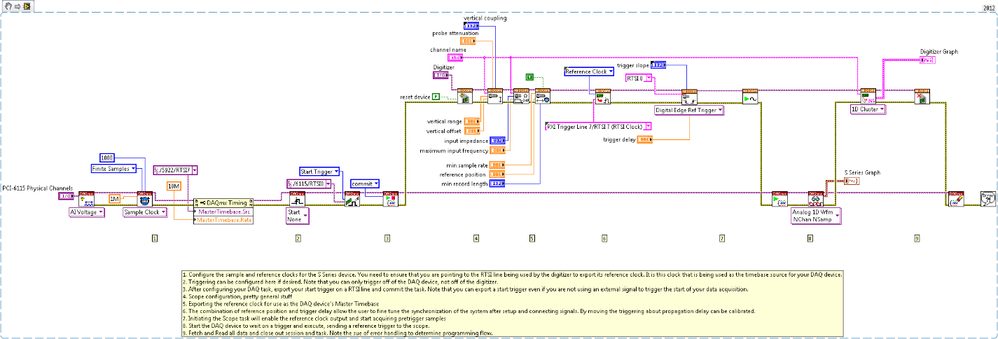
This example VI shows how to use pretrigger samples as an analog trigger when your DAQ device doesn't natively support it.
Description
The example does not have any external triggering configured, but it can be added by configuring a trigger on the DAQ device. You cannot succefully trigger the DAQ device off of the Digitizer, only the Digitizer off of the DAQ device.
With this type of triggering it is inevitable that a certain amount of delay will be observed when comparing the two devices. This delay can be adjusted for by changing the Trigger Delay and Reference Position inputs. This is not the best way to synchronize two devices, but it does work to synchronize these two devices where traditional methods fail.
Requirements
Software:
- LabVIEW 2012 (or compatible)
- NI DAQ 12.0 (or compatible)
- NI Scope 4.0 (or compatible)
Hardware:
Steps to Implement or Execute Code
1.Select channel in PCI-6115 Physical channels control.
2.Select parameters in the Vertical, Channel, Horizontal and Scope Trigger Calibration.
3.Run the VI.
Additional Information or References
VI Snippet
**This document has been updated to meet the current required format for the NI Code Exchange.**


