Overview
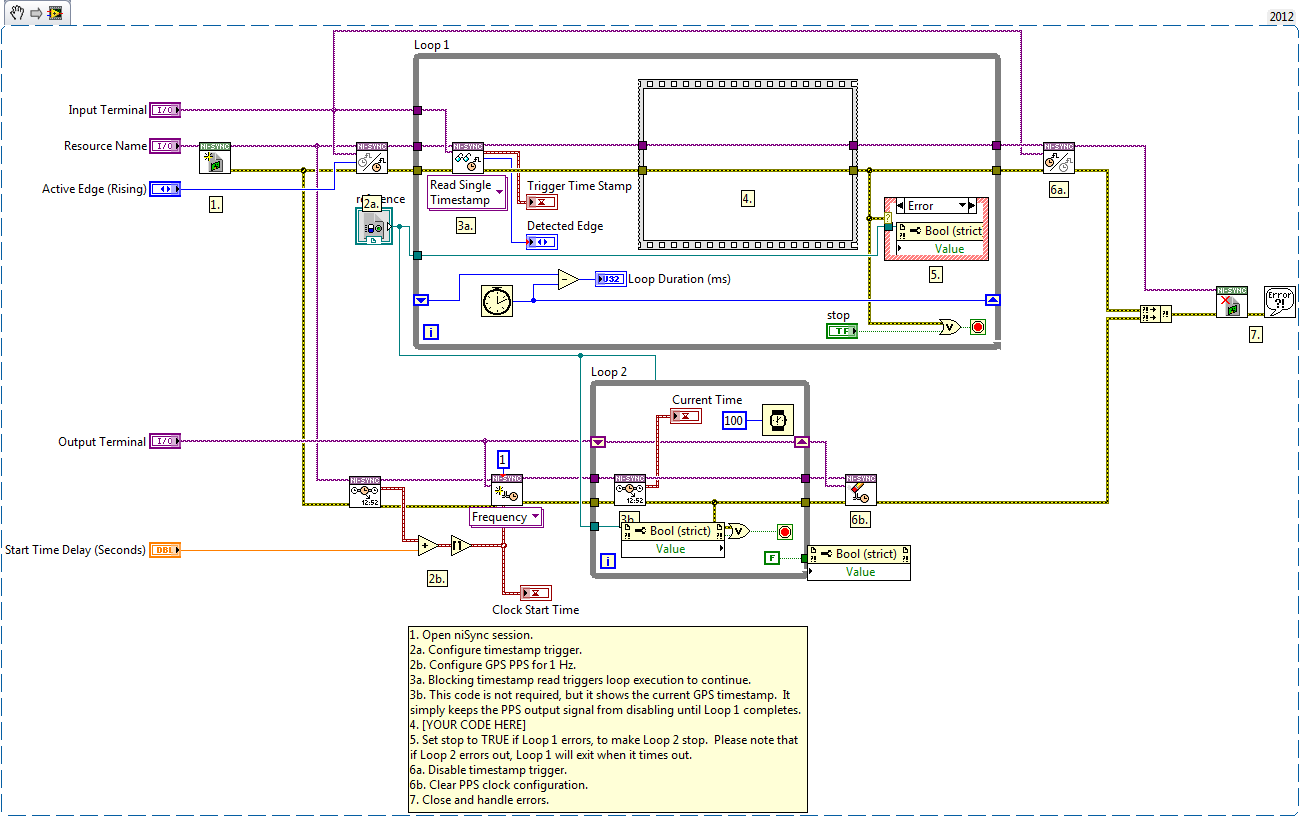
Demonstrates how to use a GPS PPS signal in hardware to trigger and control the execution timing of a software loop.
Description
Unlike DAQmx Events on M and X Series devices, niSync hardware cannot directly generate a software event. However, if you want to sync your software execution timing with GPS (or any external trigger), you can create a physical clock on the 6682 (GPS PPS) that is used to trigger timestamps. By using a blocking read on the timestamp data to control execution flow, you can ensure that your software loop only fires when a timestamp is latched. This causes the software only to iterate when a physical trigger is received.
Requirements
Software:
- LabVIEW 2012 (or compatible)
- NI-Sync 14.0(or compatible)
Steps to Implement or Execute Code
- Open niSync session.
2a. Configure timestamp trigger.
2b. Configure GPS PPS for 1 Hz.
3a. Blocking timestamp read triggers loop execution to continue.
3b. This code is not required, but it shows the current GPS timestamp. It simply keeps the PPS output signal from disabling until Loop 1 completes.
- Put your code into the programming diagram.
- Set stop to TRUE if Loop 1 errors, to make Loop 2 stop. Please note that if Loop 2 errors out, Loop 1 will exit when it times out.
6a. Disable timestamp trigger.
6b. Clear PPS clock configuration.
- Close and handle errors.
Additional Information or References
VI Snippet
**This document has been updated to meet the current required format for the NI Code Exchange.**


