Overview
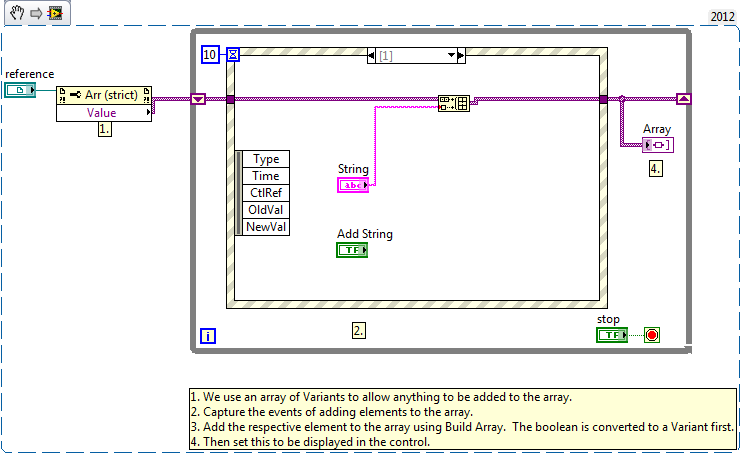
This example VI demonstrates how to store different types of data into the same array using Variants.
Description
In LabVIEW you are not usually able to create arrays containing different data types. Using the Variant data type, you are able to convert any data type to a single format and create an array with a consistent data type.
Requirements
- LabVIEW 2012 (or compatible)
Steps to Implement or Execute Code
- Download the attached files to your computer
- Open the VI "Create Generic Data Type Array LV2012 NI Verified.vi"
- Run the program
- Change the Numeric control and click Add Numeric
- Change the String control and click Add String
- Change the Boolean control and click Add Boolean
- Click STOP to stop the VI
Additional Information or References
VI Block Diagram
**This document has been updated to meet the current required format for the NI Code Exchange.**
Jared S.
Applications Engineering
National Instruments


