Simple SPI Read with NI-DAQmx DIO
 Example_Scrubber_Suryo
05-29-2017
10:57 PM
Example_Scrubber_Suryo
05-29-2017
10:57 PM
- Subscribe to RSS Feed
- Mark as New
- Mark as Read
- Bookmark
- Subscribe
- Printer Friendly Page
- Report to a Moderator
Products and Environment
This section reflects the products and operating system used to create the example.To download NI software, including the products shown below, visit ni.com/downloads.
- Data Acquisition (DAQ)
Hardware
- LabVIEW
Software
- NI DAQmx
Driver
Code and Documents
Attachment
Overview
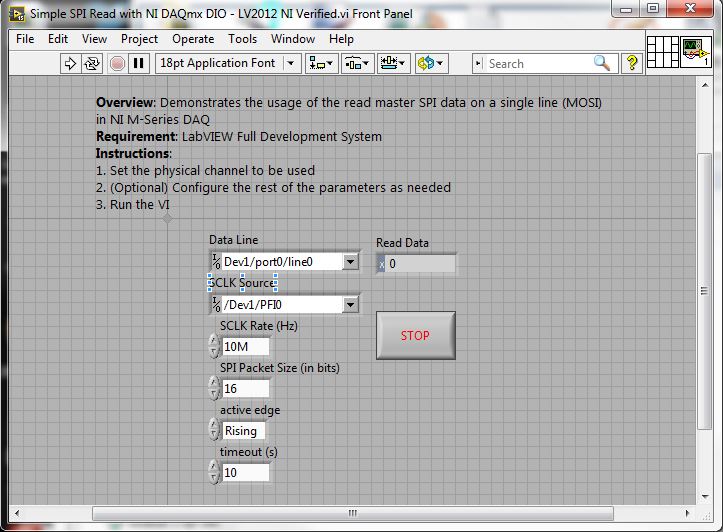
The example shows the usage of the read master SPI data on a single line (MOSI) in NI M-Series DAQ
Description:
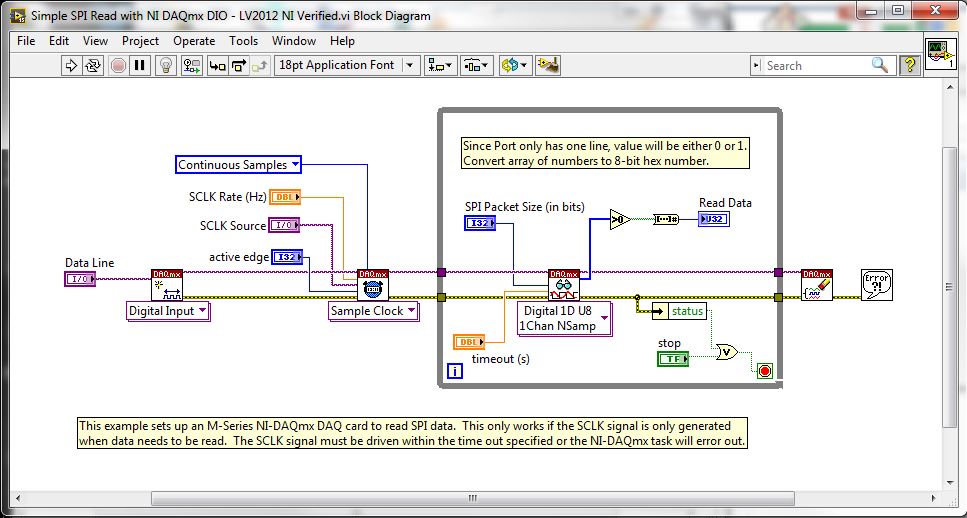
This simple VI would demonstrates how to use the read on a single line of the SPI, which includes the utilization of the convert array and DAQmx functions
Steps to implement or execute code
To implement this example:
- Set the physical channel to be used
- (Optional) Specify the rest of the parameters as needed
- Run the VI
- (Optional) Turn on the Highlight Execution to see the flow of the VI
To execute this example:
- Install the required software.
- Connect the DAQ hardware that supports the DIO features
- Confirm the connection with the MAX with TestPanel
- Open the VI and refer the Implement Steps
Requirements
Software
LabVIEW 2012 or compatible
NI-DAQmx 16.0 or compatible
Hardware
cDAQ with C series Digital IO Module
**This document has been updated to meet the current required format for the NI Code Exchange.**
SISU
Example code from the Example Code Exchange in the NI Community is licensed with the MIT license.


- Mark as Read
- Mark as New
- Bookmark
- Permalink
- Report to a Moderator
Is there documentation on this example? For example why are the input values being compared to 0? Why are there timeouts during the read?

- Mark as Read
- Mark as New
- Bookmark
- Permalink
- Report to a Moderator
Good question,
Since its only a clip, there is no documentation, sorry about that. Also, the comparison to zero is done to convert the array of U8 numbers from the Read function to a single U32 number, and so it can be viewed as HEX, etc. The conversion stricly isn't needed, so if you want to work with a U8 array instead of a single U32, it can be removed.
SISU
- Mark as Read
- Mark as New
- Bookmark
- Permalink
- Report to a Moderator
I have another question, why use the DAQmx tools when there is the SPI Digital Waveform Library? Aren't the functions essentially the same thing?
- Mark as Read
- Mark as New
- Bookmark
- Permalink
- Report to a Moderator
The SPI Digital Waveform Library is targeted to our NI-HSDIO hardware, which has an onboard clock that can be used to sample the SPI bus, and several other digital IO functionality, that is not present on Multifunction DAQ products. This example code is just an example of using an M-Series DAQ board, and more information regarding the limits of using DAQ for SPI can be found here: https://forums.ni.com/t5/Example-Code/Serial-Protocol-Communication-Reference-Design-for-Digital/ta-...
SISU
- Mark as Read
- Mark as New
- Bookmark
- Permalink
- Report to a Moderator
Wow, glad I asked, super helpful! Do you think your M-Series example would still work for and X-Series device? Specifically I'm using the 6343...
- Mark as Read
- Mark as New
- Bookmark
- Permalink
- Report to a Moderator
Glad I could help! As for using an NI 6343, I don't know. Give it a try, I don't see why this code wouldn't work, after all it is just DAQmx code. If anything, an X-Series card might have newer features that make doing this kind of thing easier, but I can't think of a specific example right now. Good luck!
SISU

- Mark as Read
- Mark as New
- Bookmark
- Permalink
- Report to a Moderator
hi,
I am doing a LabView project that needs to acquire data at 30MHz from a chip in debugging mode. The chip uses SPI protocol to send data and the chip acts as SPI master. Do you think M-Series can support 30MHz clock speed as a Slave?
If not, would you kindly suggest me any other NI device that can be configured as SPI slave and is capable of acquiring data at 30MHz.
Cheers 
- Mark as Read
- Mark as New
- Bookmark
- Permalink
- Report to a Moderator
This would be a great question for the community forums: http://forums.ni.com/
SISU


- Mark as Read
- Mark as New
- Bookmark
- Permalink
- Report to a Moderator
I hope this helps, Model and buffer ratres.
Model AI Rate Single Ch.
USB-6341 8/16 500 kS/s
USB-6343 16/32 500 kS/s
USB-6351 8/16 1.25 MS/s
USB-6353 16/32 1.25 MS/s
USB-6361 8/16 2 MS/s
USB-6363 16/32 2 MS/s
USB-6356 8 1.25 MS/s
USB-6366 8 2 MS/s

- Mark as Read
- Mark as New
- Bookmark
- Permalink
- Report to a Moderator
I am trying to find a simple way to write over SPI with a USB-6351. I have used this example to successfully read SPI, but I have had no luck reversing it.

- Mark as Read
- Mark as New
- Bookmark
- Permalink
- Report to a Moderator
Hi,
I am new working on Labview, I am trying to generate 1ms digital output pule but I am getting the 1.6ms.
Could you help me to resolve this problem please?
Many Thanks.

