Overview
This VI programmatically calls Microsoft paint to print a PNG file to your default printer.
Description
This VI use System Exec VI to call Microsoft paint and print a PNG file to your default printer.
Requirements
- LabVIEW 2012 (or compatible)
Steps to Implement or Execute Code
- Download the attached VI and PNG File.
- Enter the correct paths of the .png file you just downloaded.
- Run "Print Image from Microsoft Paint 2012 NI Verified.vi"
- Enter the path to the print image you wish to save.
Additional Information or References
VI Block Diagram
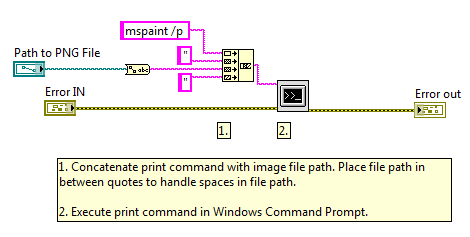 print.png
**This document has been updated to meet the current required format for the NI Code Exchange.**


