Programmatically Determine if a Sub-VI or VI is Running in LabVIEW

Produtos e Meio Ambiente

Esta seção reflete os produtos e o sistema operacional utilizados para criar o exemplo.

Para baixar o software NI, incluindo os produtos abaixo, visite ni.com/downloads.

    Software

  • LabVIEW

Código e Documentos

Anexo

Baixar tudo

Overview

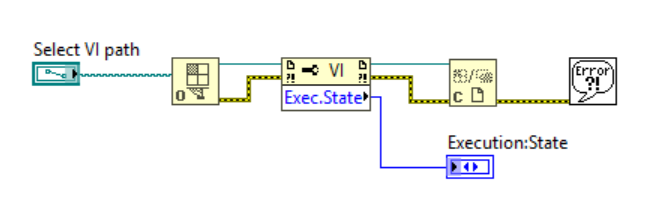
This VI demonstrates how to programmatically determine if a sub-VI or VI is running on your computer.


Requirement

LabVIEW Full Development System 2012 or compatible


Steps to Implement or Execute Code

  1. Enter the path of the VI to determine its status
  2. Run the VI, The VI will return the following Execution States:
    Bad—VI has errors and cannot execute or VI is not currently running
    Idle—VI is not running, but is in memory.
    Run top level—VI is the top-level VI in an active hierarchy.
    Running—VI is reserved for execution by one or more active top-level VIs.

Additional Information or References

VI Block Diagram
3580.PNG


**This document has been updated to meet the current required format for the NI Code Exchange. **


Aaron W.
National Instruments

Ao enviar o código para a Comunidade NI, você concorda com as condições da licença MIT. Saiba mais sobre a Política de licenciamento de exemplo de código da NI.

Comentários
comrade
Active Participant
Active Participant
em

And to determine whether a VI with Exec.State "Running" as actually being run at the time, try this:

https://lavag.org/topic/16660-how-to-get-actual-vi-execution-state/#entry109694