Overview
This example shows how to edit the properties of multiple table cells.
Description
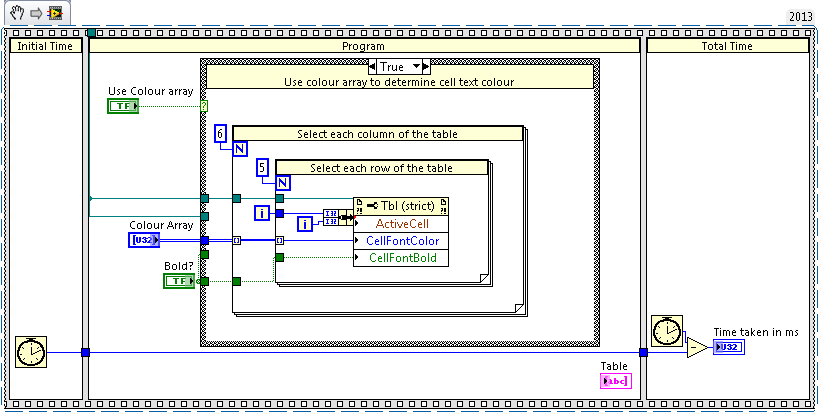
This piece of code demonstrates how to change the bold state and font color for elements of a table on the front panel. The same principles shown in this program can be applied to other properties, such as the cell background color, or italic state.
Currently the application allows you to set the bold font state of all cells and the font color state of all cells. There is also the option to change the font color of individual cells, using the color box array on the front panel and the enable option.
Simply select the options you wish to see, and click run.
There are also simple benchmarking features added in to view the time taken for the VI to execute.
Requirements
- LabVIEW 2013(or compatible)
Steps to Implement or Execute Code
- Open Mass Table Edit.vi
- Select the settings you wish to see displayed on the table
- Run the program
Additional Information or References
VI Block Diagram
**This document has been updated to meet the current required format for the NI Code Exchange.**


