Overview
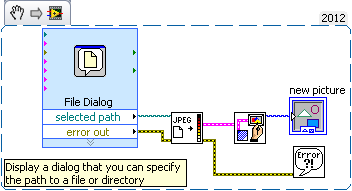
This example VI shows how you can pass a JPEG picture into LabVIEW and view it.
Description
Uses the File Dialog VI to open up a browsing window to have the user find the file they wish to view,and the VI reads the JPEG information and converts it from a string format to a format that can be displayed in the Picture Control located on the front panel.
Requirements
- LabVIEW 2012(or compatible)
Steps to Implement or Execute Code
To make this example work with your code, or as a standalone application:
- Run the VI
- Select the JPEG file you want to display
Additional Information or References
VI Snippet
**This document has been updated to meet the current required format for the NI Code Exchange.**


