Description
Description-Separate-1Overview
This example shows how to use the the VeriStand RealTimeSequenceDefinition API to create a Real-Time sequence and how to add that sequence to a Stimulus Profile. This allows you to programmatically edit and build sequences and profiles from a LabVIEW VI.
Description
The VeriStand .NET API allows you to programmatically control many of VeriStand's software operations from the LabVIEW environment. The Stimulus Profile Editor allows the user to create, modify, and execute test sequences. A stimulus profile can be used to call a real-time sequence to run on the real-time target. For more information on how to do this within the Stimulus Profile Editor, check out this document: Creating Real-Time Stimulus Profiles in NI VeriStand.
This VI shows how to create a real-time sequence and add it to your stimulus profile all within LabVIEW.The VI follows this sequence to do so:
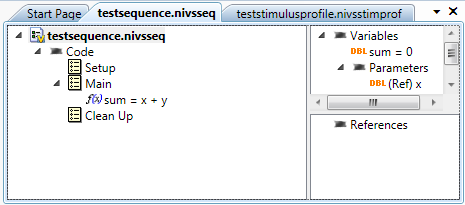
1. Create a new real-time sequence.
2. Add x and y parameters of type double.
3. Set the return variable to also be a double.
4. Add the addition expression to the Main section.
5. Save the sequence.
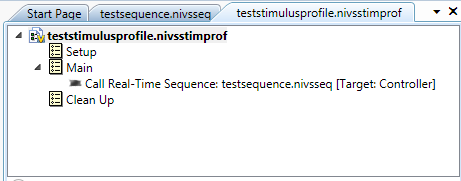
7. Create a new Stimulus Profile
8. Load list of Steps in the Main section
9. Load Sequence as a Step
10. Configure the Call's Parameters
11. Add the steps back to the profile
12. Save the Stimulus Profile

Requirements
Software
- LabVIEW 2011 SP1 or compatible
- VeriStand 2011 SP1 or compatible
Note: Could use later versions of the software but LabVIEW and VeriStand versions should match
Hardware
- (optional) A real-time controller (with VeriStand support installed) on which to run the real-time sequence
Steps to Execute Code
- Open stimulus profile.vi and run.
- This will create two files, testsequence.nivsseq and teststimulusprofile.nivsstimprof, and save them to the same directory as the VI
- You can open these files in VeriStand's "Stimulus Profile Editor" to see the test sequence that has been created
**This document has been updated to meet the current required format for the NI Code Exchange.**
Description-Separate-2


