Overview
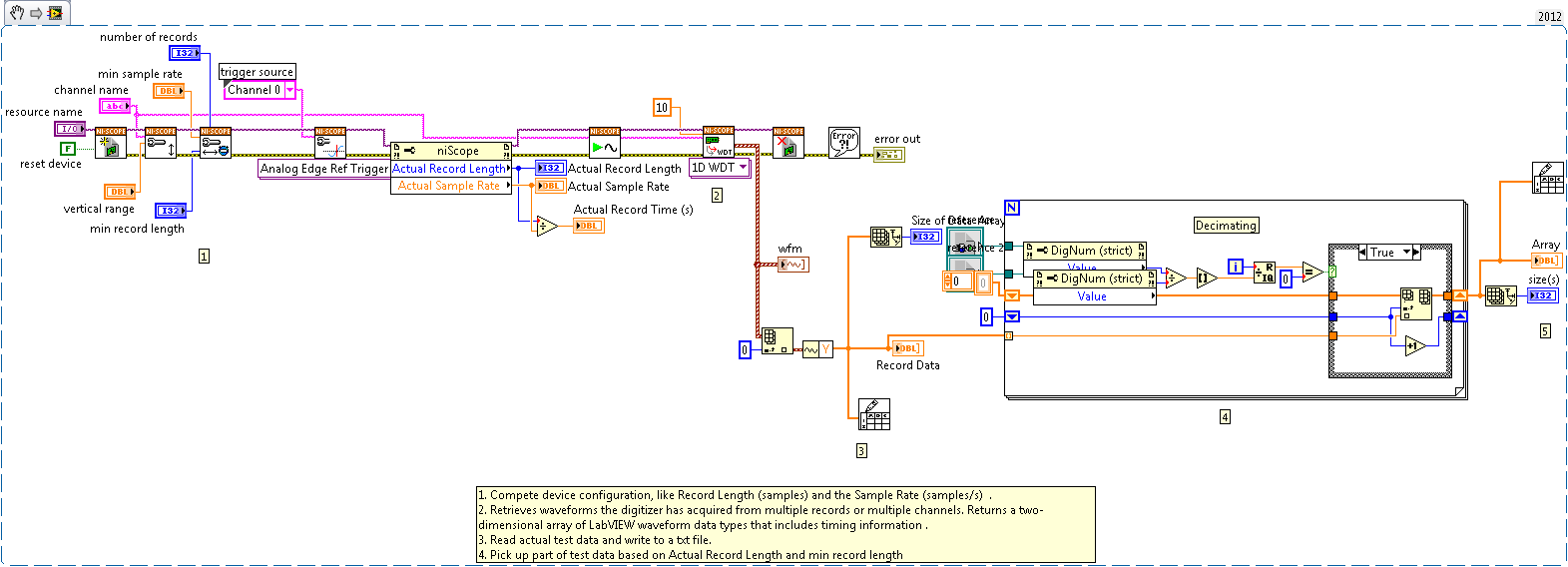
Digitizer cards have a minimum sample rate. If the sample rate is smaller than minimum sample rate, the niScope Driver will preserve the Record Time(s), and hence increase the Record Length. Decimation is a technique for reducing the number of samples in a discrete-time signal. This example shows the user how to do this.
Description
The NI-Scope driver allows you to set the Record Length (samples) and the Sample Rate (samples/s). This in turn gives us the Record Time (s) = Record Length/Sample Rate. For example, if we want a Record Time of 3 seconds and want our Record Length to be 30 samples, then we would set out Sample Rate to 10 samples/s. Now, each of our digitizer cards have a minimum sample rate, for the PXI-5105, the minimum sample rate is 915 samples/s. So how do we perform the previous acquisiton then? The NI-Scope Driver will preserve the Record Time(s), and hence increase the Record Length. Then, to go back to having only 30 samples a record we will have to decimate our data.
Requirements
- LabVIEW 2012 (or compatible)
- NI-SCOPE
Steps to Implement or Execute Code
- Compete device configuration, like Record Length (samples) , the Sample Rate (samples/s) and Resource Name.
- Run the application
- Choose the txt file pathes to save Acutal test data and Decimated test data.
Additional Information or References
VI Snippet
**This document has been updated to meet the current required format for the NI Code Exchange.**
Applications Engineer
National Instruments


