Overview
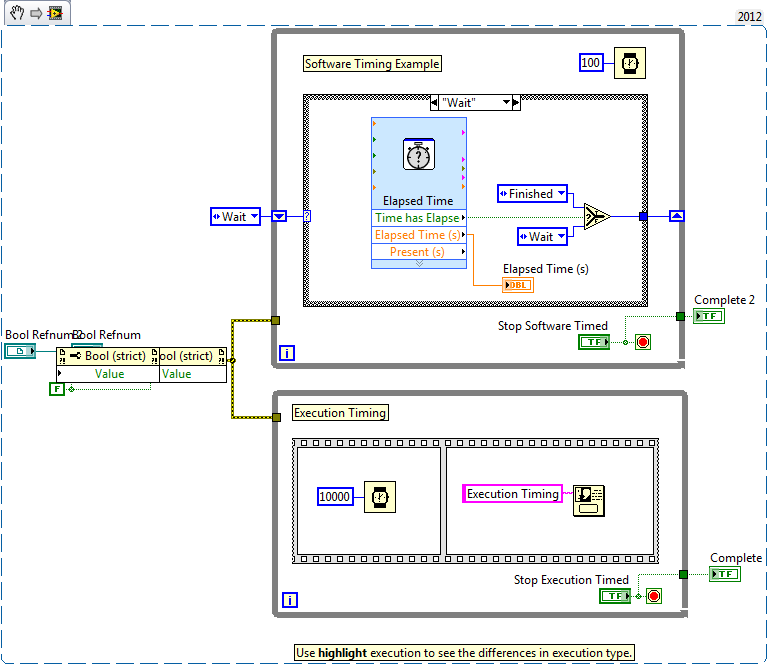
This VI shows the key advantage of using software timing over execution timing - maintaining responsiveness while timing a task.
Description
Execution Timing:
We can use functions like "Wait (ms)" and "Wait Until Next mx Multiple" to control the execution speed of our LabVIEW VIs - this could be to set the rate of a loop or introduce delays to allow instruments to respond to a command.
Software Timing:
Software timing is used when we want a process to run for a given period of time. The VIs we use for this are the Elapsed Time Express VI, or we can create a functional global variable and use "Get Date/Time in Seconds".
Example:
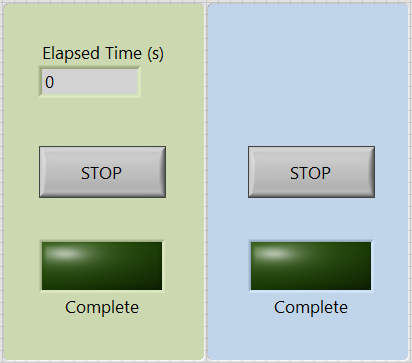
Take a look at the attached VI to see the key advantage of using software timing over execution timing - maintaining responsiveness while timing a task. Both loops perform the same function - waiting for 10 seconds before displaying a dialog. Note that the software timed version can be interrupted, however the execution timing can't.
Requirements
- LabVIEW 2012 (or compatible)
Steps to Implement or Execute Code
- Run the VI.
- Click on STOP button of the two timing, and can see that the software timed version
can be interrupted, however the execution timing can't.
Additional Information or References
Front Panel
VI Snippet
**This document has been updated to meet the current required format for the NI Code Exchange.**