Overview
In reading vision files, it is often useful to obtain the Image type, width, and height of the image before reading the image into memory. This allows us to create image space in memory for the appropriate type of image without hardcoding RGB32, U8 etc.
Description
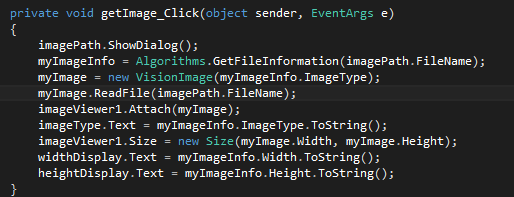
This example demonstrates how we can utilize the Vision.FileInformation class to read what type of image is on disk. We can then allocate space in memory for the image with the appropriate type using the VisionImage class.
Steps to Implement or Execute Code
- Open the GetImageInfoAndDisplay.sln file in Visual Studio
- Run the Code
- Select the 'Get Image' button and browse to an image of your choice
- The example will populate the Image type, Width and Height fields while displaying your image.
Note your ability to select different image types such as color and grayscale.
Requirements
Software
Visual Studio 2012
NI Vision .NET API
NI Vision Acquisition .NET API
Hardware
N/A
Additional Images or Video
Code snippet of the Get Image routine. This code snippet makes use of OpenFile Dialog for browsing image as well as the GetFileInformation function to retrieve information about the file on disk.
Cole R.
National Instruments
Software Engineer


