This example shows how to code a program that calculates how long a button is pressed using an event structure.
2. Description:
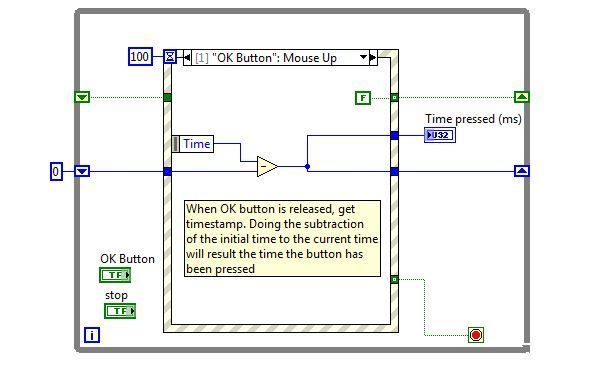
This VI uses the properties of the event structure to calculate the time a button is pressed. As the structure provides the time for the Mouse Down and Mouse Up events, the time between them can be calculated by taking a timestamp in the Mouse Down event and subtracting it to the timestamp provided in the Mouse Up event. This is how the code is implemented in this example.
3. Requirements
- LabVIEW 2012 (or compatible)
4. Steps to Implement or Execute Code
- Run " Time While Button Pressed LabVIEW 2012 NI Verified.vi"
- Click OK Button and mantain it clicked. The Time Pressed (ms) will display the time elapsed.
- Click Stop to finish the execution
5. Additional Information or References
VI Block Diagram
**This document has been updated to meet the current required format for the NI Code Exchange.**


