Overview
This VI calculates the vector cross product of two 3x1 vectors.
Description
Cross product is perpendicular to A Vector and B Vector. The following figure shows A Vector, B Vector, and Cross product of A x B.

The VI uses the following equation to calculate the cross product of A x B:
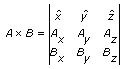
Ax, Ay, and Az are x-, y-, and z-coordinates of A Vector. Bx, By, and Bz are x-, y-, and z-coordinates of B Vector.
x,y and z are unit vectors in Euclidean space.
Requirements
Software:
- LabVIEW 2012 (or compatible)
Steps to Implement or Execute Code
1. Enter the x-, y-, and z- coefficients of vectors A and B into the defined arrays.
2. Run the VI and observe the resulting cross product.
Additional Information or Resources

**This document has been updated to meet the current required format for the NI Code Exchange.**


