Overview
Sometimes you want to retain data in your charts and graphs, sometimes you don't. This example shows how to optionally clear a chart or graph at Run-Time.
Description
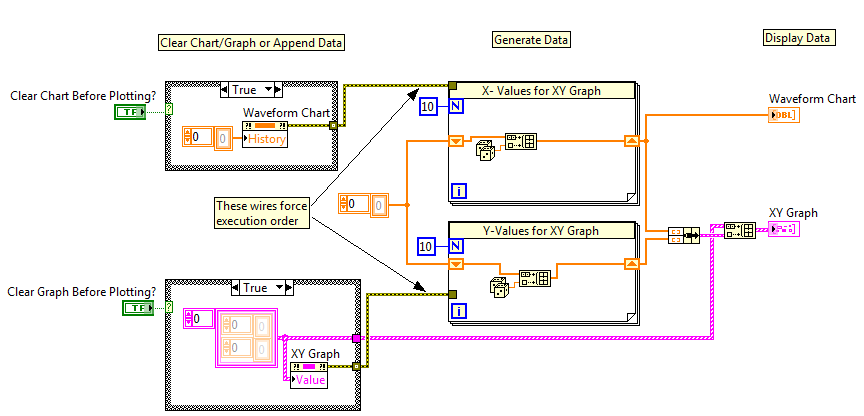
This VI demonstrates the use of property nodes to clear a chart or a graph. The user selects whether or not he wants the chart or graph to be cleared by pressing the button on the front panel. The case structures allow the choice to be implemented. The two for loops in the middle of the code generate the data to be plotted.
Requirements
LabVIEW 2012 (or compatible)
Steps to Implement or Execute Code
1. Run the VI a few times and notice that the data is appended to the chart or graph.
2. Press the buttons below the chart and graph displays.
3. Run the VI again and notice that the previous data in the chart and graph was cleared before plotting the new data.
Additional Information or References
The chart and graph have different properties that must be set in order to clear the display. Chart = History Data property; Graph = Value property
Also note that, since graphs don't have a history buffer, they always "clear". New data simply replaces old data. This example simulates a buffer by loading the old graph value at the beginning of each new call in an array, then appending the generated data to the array and displaying it in the graph.
To "clear" the graph in this example, all you really need to do is to write an empty array to the "Value" property node of the graph. However, it can take some time to send the new data to the graph after pressing the button. Therefore, it is recommended to use some Dataflow dependencies to force the "clearing" to happen at the beginning of the program.
**This document has been updated to meet the current required format for the NI Code Exchange.**


